
If you own property in a city or town in Gujarat — a flat, a shop, a plot in a residential scheme — the Urban Land Record (શહેરી જમીન રેકોર્ડ) on AnyRoR portal is your primary tool to verify ownership, check encumbrances (બોજો), and confirm property tax dues before any transaction (મિલકત વ્યવહાર).
Unlike Rural Land Records which are governed by Survey Numbers (સર્વે નંબર) under Talati offices, Urban Land Records fall under the City Survey Office (સીટી સર્વે ઓફિસ) and are maintained as Property Cards (મુળ કાર્ડ) and Unit Property Cards (એકમ કાર્ડ). These records cover all properties within municipal limits (નગરપાલિકા હદ) — residential, commercial, and mixed-use.
The Urban Land Record portal is accessible at e-milkat.gujarat.gov.in and is also linked from the main AnyRoR portal at anyror.gujarat.gov.in. Records are publicly available, free to view, and updated by the Revenue Department of Gujarat (ગુજરાત મહેસૂલ વિભાગ).
How Does Urban Land Record (શહેરી જમીન રેકોર્ડ) Help You?
- Verify Ownership (માલિકીની ચકાસણી) — Confirm the current owner’s name (વર્તમાન માલિક) before any purchase or lease agreement.
- Check Property Tax Dues (મિલકત કર બાકી) — See total pending dues (કુલ બાકી રકમ) before purchasing — unpaid taxes become the buyer’s liability.
- Identify Original Holder (મૂળ ધારક) — Trace the original grant of the property and confirm the ownership chain (માલિકી સાંકળ).
- Verify Jantri Value (જંત્રી) — Government’s benchmark value of the property for stamp duty calculation (સ્ટેમ્પ ડ્યૂટી).
- Check Sub-Registrar Deed Details (સબ-રજિસ્ટ્રાર ડીડ) — Verify that the sale deed is registered (નોંધાયેલ) and matches property records.
- Court & Revenue Case Status (કોર્ટ કેસ) — Check if any civil court (સિવિલ કોર્ટ) or High Court (હાઈકોર્ટ) case is active on the property.
- Secure a Bank Loan (બેંક લોન) — Banks require Property Card details for home loan and mortgage processing.
- UPIN-Based Search (UPIN શોધ) — Use the unique property identification number for precise record retrieval without needing the survey number.
Types of AnyRoR Urban Land Records (શહેરી જમીન રેકોર્ડના પ્રકારો)
The AnyRoR Urban portal offers two card types and six search methods. Understanding the difference between them is essential before you begin.
Two Card Types — Which One Should You Select?
| Card Type | What It Shows | |
|---|---|---|
| PC | Property Card (મુળ કાર્ડ) Also called: Mul Card | Complete plot-level land record — survey number, original holder, current holder, FP number, TP number, land area, and land use. ⚖ Use for: Verifying full ownership chain before buying a plot or flat. |
| UPC | Unit Property Card (એકમ કાર્ડ) Also called: Ekam Card | Individual unit-level record for a flat, shop, or independent unit within a larger property. Shows the unit holder, floor, and unit number. ⚖ Use for: Buyers purchasing a flat in a housing society or apartment complex. |
Six Search Methods — Select Any One (કોઈ એક પસંદ કરો)
| Record Type | Gujarati Name | When to Use |
|---|---|---|
| Survey No. Details | સર્વે નંબરની વિગત | When you have the survey number of the property — most common search method |
| Nondh No. Details | નોંધ નંબરની વિગત | When you have the mutation/entry number (નોંધ નંબર) from a previous transaction |
| 135D Notice Details | ૧૩૫ડી નોટિસની વિગત | To check if a mutation is currently in process on an urban property |
| Know Survey No. by Owner Name | માલિકના નામ પરથી સર્વે નંબર | When you know the owner's name but not the survey number |
| Entry List by Month-Year | વર્ષ-મહિના મુજબ નોંધો | To see all mutations registered in a particular ward during a specific month |
| Know Survey No. by UPIN | UPIN પરથી સર્વે નંબર | When you have the Unique Property Identification Number (UPIN) assigned by the government |
How to Access Urban Land Record Online
શહેરી જમીન રેકોર્ડ ઑનલાઇન કેવી રીતે ઍક્સેસ કરવો — Step-by-Step Process
Accessing urban land records (શહેરી જમીન રેકોર્ડ) on AnyRoR is completely free for viewing. No registration or login is required for basic access. Follow these steps exactly.
STEP 1 — Navigate to the AnyRoR Portal — Access Land Record Urban
Open your browser and go to the main AnyRoR homepage: anyror.gujarat.gov.in
- On the homepage, find the service slider. Scroll through the buttons until you see:
- ACCESS LAND RECORD – URBAN (શહેરી જમીનનો રેકર્ડ) — Click the button.
- You can also directly visit the Urban Land Record portal: e-milkat.gujarat.gov.in
The AnyRoR homepage slider shows multiple service buttons. The Urban Land Record button appears in the slider along with Digitally Signed ROR and View Land Record – Rural. Make sure you select Urban (શહેરી) — not Rural (ગ્રામ્ય).

STEP 2 — Select Card Type (કાર્ડ પ્રકાર પસંદ કરો)
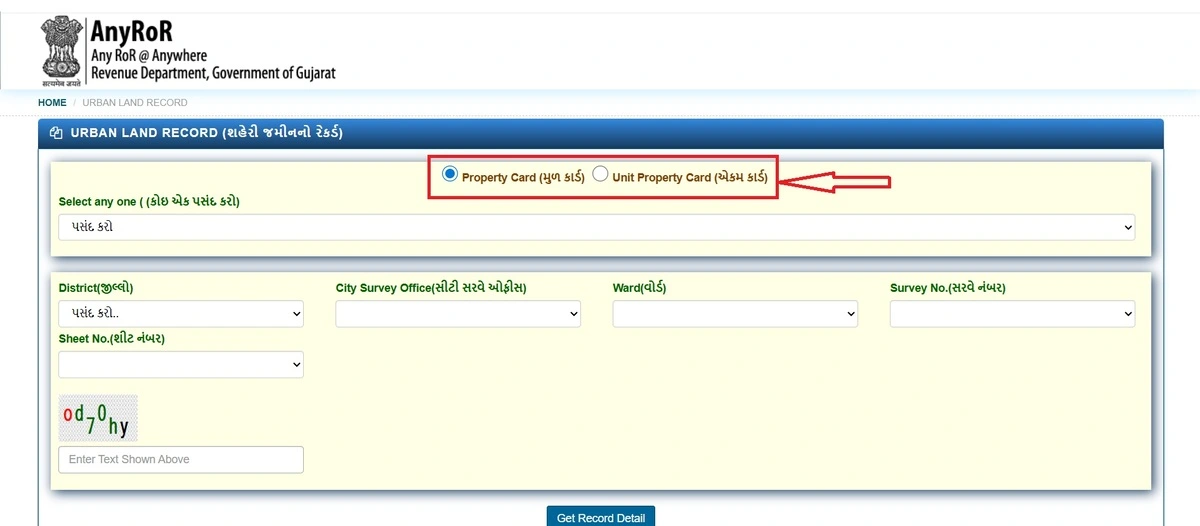
The Urban Land Record page shows two radio button options at the top. You must select one before proceeding:
- Property Card (મુળ કાર્ડ) — Select this if you are looking up a plot, independent house, or commercial property.
- Unit Property Card (એકમ કાર્ડ) — Select this if you are looking up a flat, shop, or unit in a housing society (સોસાયટી).
If you are buying a flat in Ahmedabad, Surat, or Vadodara — always select Unit Property Card (એકમ કાર્ડ). For independent bungalows or commercial plots, use Property Card (મુળ કાર્ડ).
STEP 3 — Select Record Type from Dropdown (રેકોર્ડ પ્રકાર પસંદ કરો)
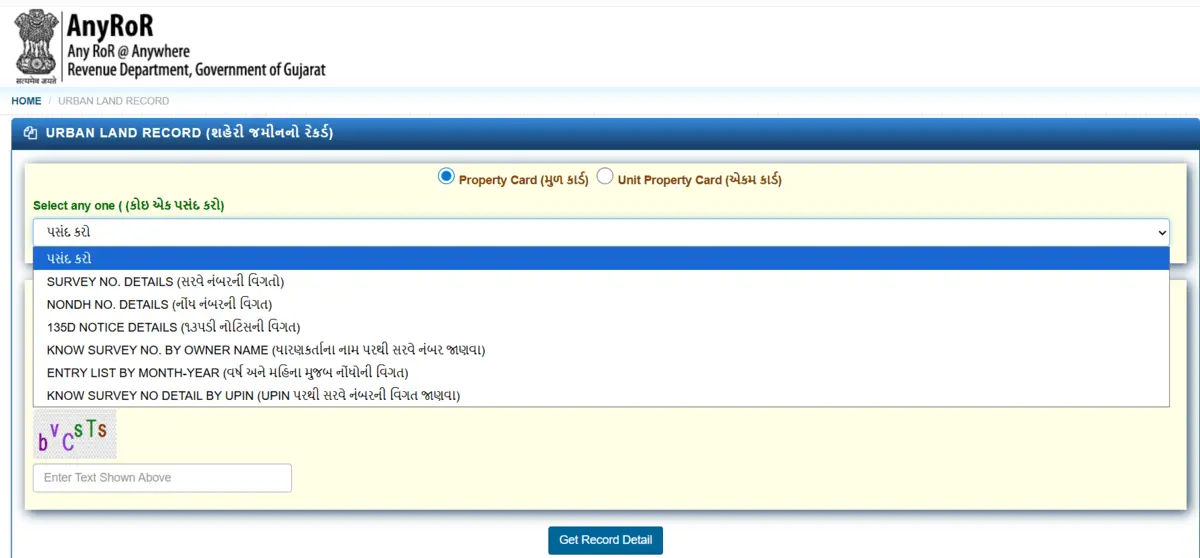
Below the card type selection, you will find the 'Select Any One (કોઈ એક પસંદ કરો)' dropdown. Click it to see all six search options — visible as shown in the portal screenshot below:
- Survey No. Details (સર્વે નંબરની વિગત) — most commonly used
- Nondh No. Details (નોંધ નંબરની વિગત)
- 135D Notice Details (૧૩૫ડી નોટિસની વિગત)
- Know Survey No. by Owner Name (માલિકના નામ પરથી સર્વે નંબર)
- Entry List by Month-Year (વર્ષ અને મહિના મુજબ નોંધણીની વિગત)
- Know Survey No. Detail by UPIN (UPIN પરથી સર્વે નંબરની વિગત)
Select the method that matches the information you have about the property. If you have the survey number, always start there — it gives the most complete result.
STEP 4 — Enter Location Details (સ્થળ વિગત ભરો)
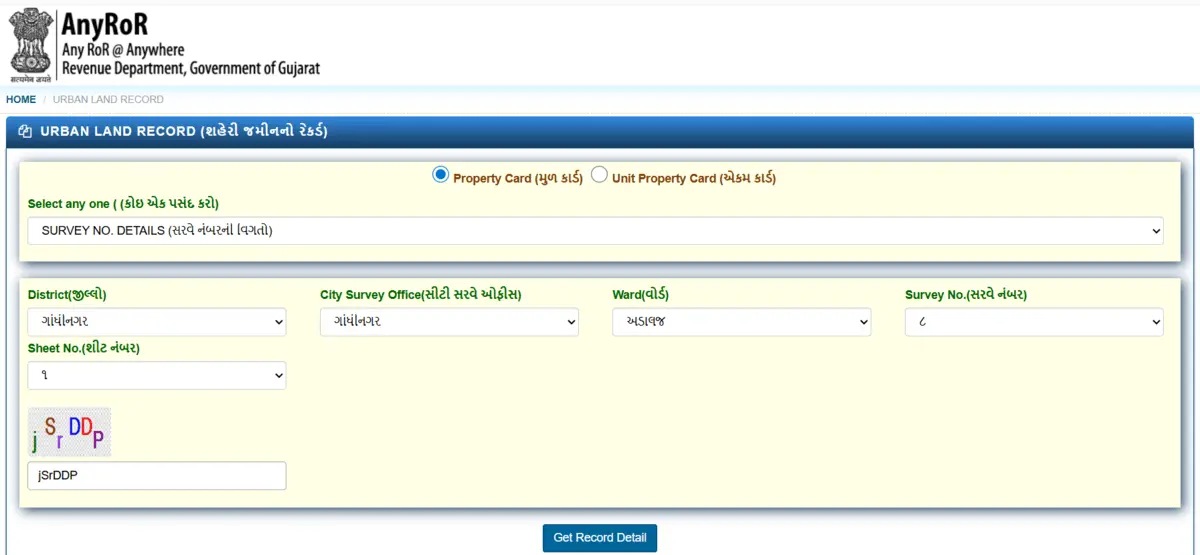
After selecting the record type, the portal will display dropdown fields specific to your selection. For Survey No. Details, fill in the following:
- District (જિલ્લો) — Select your city/district. Example: Gandhinagar (ગાંધીનગર).
- City Survey Office (સીટી સર્વે ઓફિસ) — Select the City Survey Office for your area. This auto-filters based on your district.
- Ward (વોર્ડ) — Select the ward where your property is located. Example: Adalaj (અડાલજ).
- Survey No. (સર્વે નંબર) — Enter the survey number of the property. Find it on your previous Property Card, sale deed (વેચાણ દસ્તાવેજ), or property tax receipt.
- Sheet No. (શીટ નંબર) — Select the sheet number (શીટ નંબર) from the dropdown — this is a sub-division reference within the ward.
The fields shown may vary based on your record type selection. For Nondh No. search, you will enter the Nondh Number (નોંધ નંબર) instead. For Owner Name search, you will type the owner's name as it appears on official documents.
After filling all required fields, enter the characters from the Captcha image (કેપ્ચા) into the text box below it. Then click 'Get Record Detail (રેકોર્ડ વિગત મેળવો)'.
STEP 5 — Access Property Card Details (મિલકત કાર્ડ વિગત જુઓ)
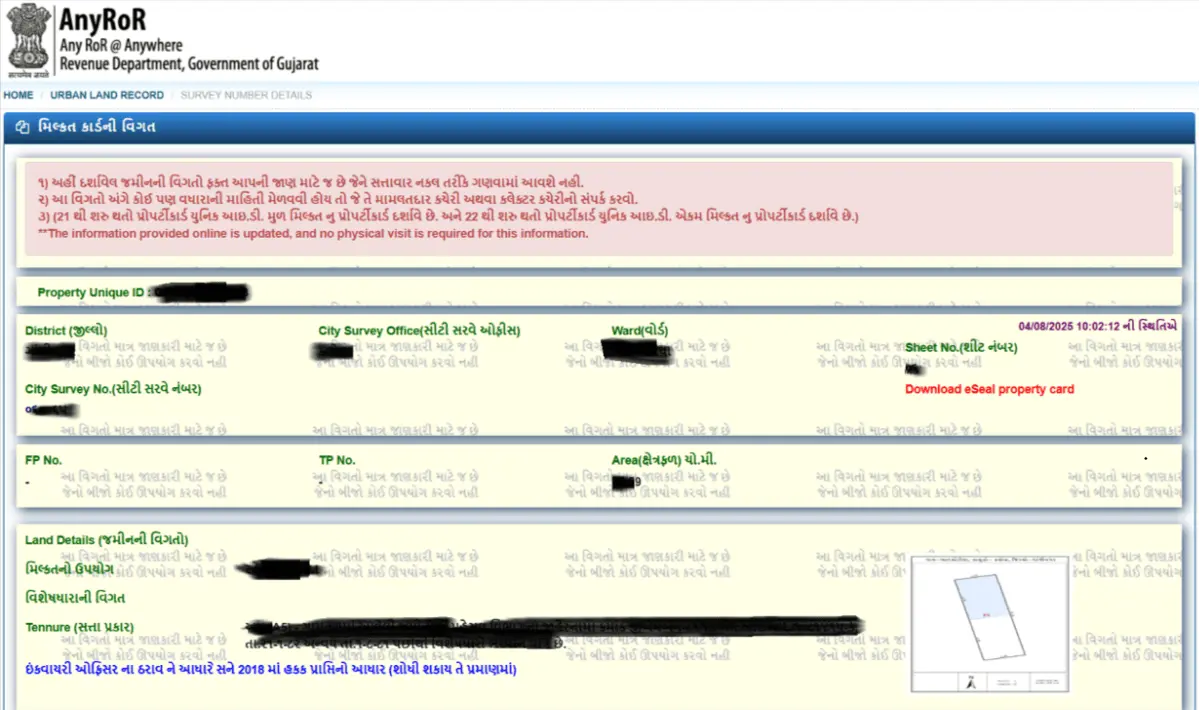
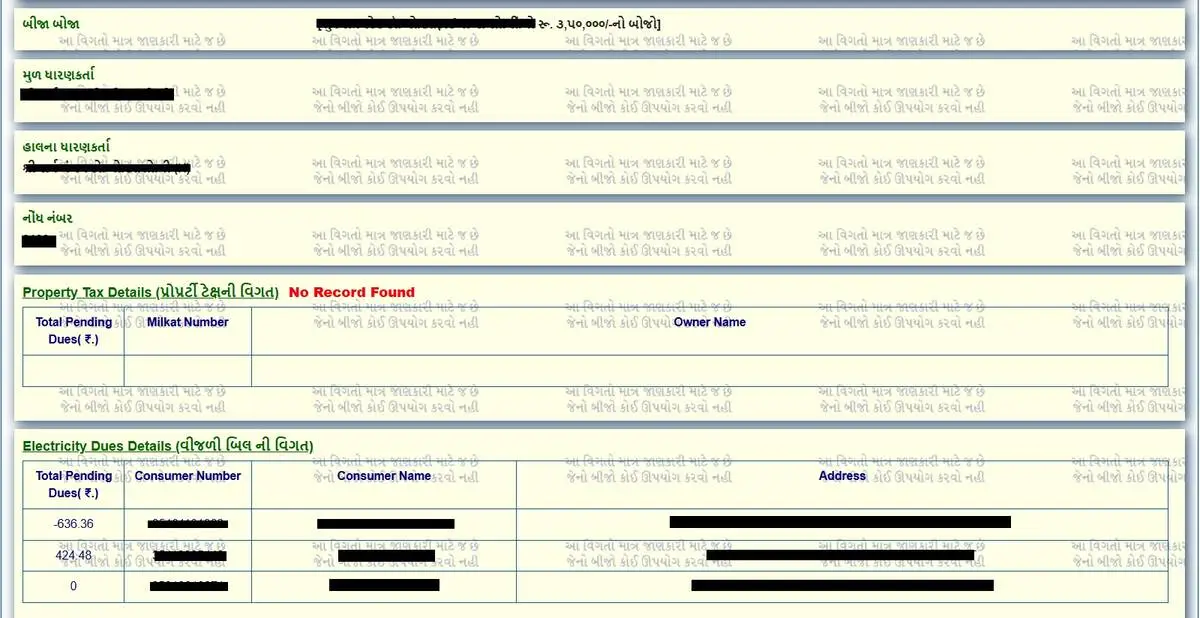
Once valid details are submitted, the full Property Card (મુળ કાર્ડ) or Unit Property Card will appear on your screen. Here is a detailed breakdown of every section you will see:
Section 1 — Property Header Details
- Property Unique ID (પ્રોપર્ટી ID) — Government-assigned unique identifier for the property.
- District, City Survey Office, Ward, Sheet No. — Location fields confirming which office maintains this record.
- City Survey No. (સીટી સર્વે નંબર) — The survey number of the property.
- Download eSeal Property Card — Link to download the officially sealed digital property card.
Section 2 — Land Details (જમીનની વિગત)
- FP No. (TP No.) — Final Plot Number and Town Planning Scheme number (ટાઉન પ્લાનિંગ) — confirms if the property is part of a TP scheme.
- Area (ક્ષેત્ર) — Land area in square meters or square yards.
- Original Holder (મૂળ ધારક) — The person or entity who was originally granted the land.
- Current Holder (વર્તમાન ધારક) — The present legal owner. This should match the seller's name exactly.
- Use of Property (ઉપયોગ) — Residential, Commercial, or Agricultural — critical for understanding permitted use.
Section 3 — Property Tax Details (મિલકત કરની વિગત)
- Total Pending Dues (કુલ બાકી રકમ) — Any outstanding property tax. Always verify this — unpaid dues transfer with ownership.
- Milkat Number (મિલ્કત નંબર) — Tax assessment number used by the municipal corporation.
- Owner Name (માલિકનું નામ) — As recorded with the municipal authority (મ્યુ. કોર્પ.).
Section 4 — Electricity Dues (વિજળી બિલ)
- Shows Consumer Number (ગ્રાહક નંબર), Consumer Name, Address, and Total Pending Dues (₹).
- If this section shows 'No Record Found' — either no dues or not linked to this survey number.
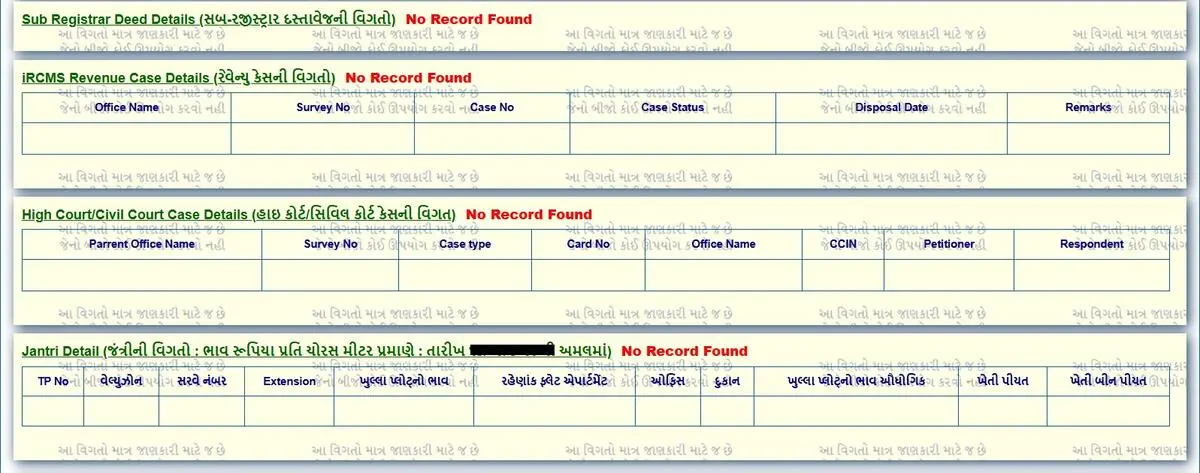
Section 5 — Sub-Registrar Deed Details (સબ-રજિસ્ટ્રાર ડીડ)
- Shows all registered sale deeds (વેચાણ દસ્તાવેજ) linked to this survey number — confirming the chain of registered transactions.
- 'No Record Found' here may mean the property has not been formally transferred via Sub-Registrar (સબ-રજિસ્ટ્રાર) — a red flag worth investigating.
Section 6 — IRCMS Revenue Case Details
- Displays Office Name, Survey No., Case No., Case Status (કેસ સ્ટેટસ), Disposal Date, and Remarks.
- An active revenue case on a property is a serious concern — do not proceed with purchase until it is resolved.
Section 7 — High Court / Civil Court Case Details
- Shows Parent Office, Survey No., Case Type, Card No., CCM, Petitioner (અરજદાર), Respondent.
- Any active court case (ચાલુ કોર્ટ કેસ) on this property means ownership is legally disputed. Never buy such a property without advice from a qualified advocate.
Section 8 — Jantri Details (જંત્રી)
- Shows TP No., Zone Name, Extension, Old Jantri Rate, New Jantri Rate (નવો ભાવ), and Use Type.
- Jantri (જંત્રી) is the government-approved benchmark value per square meter. Stamp duty (સ્ટેમ્પ ડ્યૂટી) is calculated based on this rate — always cross-check before finalising sale price.
⚖ Expert Advice: When you open a Property Card, the first thing I check is the 'Current Holder (વર્તમાન ધારક)' name — it must exactly match the name on the Sale Agreement (વેચાણ કરાર). Even a minor spelling difference can create complications during registration. If there is a mismatch, ask the seller to produce a mutation certificate (ફેરફાર પ્રમાણ) explaining the discrepancy.
STEP 6 — Save or Download the Property Card (પ્રોપર્ટી કાર્ડ ડાઉનલોડ / સેવ)
Once you have reviewed all property details, you can save or download the record:
- Print: Press Ctrl+P in your browser and select 'Save as PDF' to save the property card.
- Download eSeal Property Card: Click the 'Download eSeal Property Card' link on the results page to get a digitally sealed copy directly from the City Survey Office.
Legal Note: A simple browser printout is for reference only. For official use — bank loans (બેંક લોન), court submissions (કોર્ટ રજૂઆત), or government applications — use the eSeal Property Card downloaded directly from the portal, or obtain a Digitally Signed RoR (ડિજિટલી સાઇન્ડ RoR) from iora.gujarat.gov.in for ₹5 per copy.
Key Terms Explained (મુખ્ય શબ્દો સમજાવ્યા)
| Term | Gujarati | Meaning |
|---|---|---|
| Property Card | મુળ કાર્ડ | Plot-level urban land record showing owner, area, FP number, and land use |
| Unit Property Card | એકમ કાર્ડ | Unit-level record for flats, shops, or individual units within a property |
| Survey Number | સર્વે નંબર | Unique government-assigned number for each urban land parcel |
| Nondh No. | નોંધ નંબર | Mutation/entry number recorded when ownership changes |
| UPIN | UPIN | Unique Property Identification Number — permanent digital ID for each property |
| FP No. | TP નંબર | Final Plot Number in a Town Planning scheme — confirms legal plot status |
| Jantri | જંત્રી | Government benchmark rate per sq. metre used for stamp duty calculation |
| Original Holder | મૂળ ધારક | Person or entity to whom land was originally granted by the government |
| Current Holder | વર્તમાન ધારક | Present legal owner as recorded in the City Survey Office |
| 135-D Notice | ૧૩૫-ડી નોટિસ | Public notice inviting objections to a mutation entry — means ownership transfer is incomplete |
| City Survey Office | સીટી સર્વે ઓફિસ | Government office responsible for maintaining urban land records |
| eSeal Property Card | eSeal કાર્ડ | Digitally sealed and officially authenticated property card — valid for bank and legal use |
Frequently Asked Questions (વારંવાર પૂછાતા પ્રશ્નો)
How can I check AnyRoR urban land record online in Gujarat?
You can check AnyRoR urban land record online by visiting the official Gujarat portal anyror.gujarat.gov.in or e-milkat. Select Urban Land Record, choose Property Card or Unit Property Card, and search using survey number, owner name, or UPIN to instantly view details.
Can I download AnyRoR urban land record PDF online?
Yes, you can download the AnyRoR urban land record PDF using the eSeal Property Card option available after viewing the record. This PDF is digitally verified and can be used for legal, bank, or property transactions.
What is the official website for AnyRoR Gujarat land records?
The official website for checking land records is anyror.gujarat.gov.in, and for urban property details specifically, you can use e-milkat.gujarat.gov.in. Always use these government sites to avoid incorrect or outdated data.
What is the difference between urban land record and 7/12 Utara Gujarat?
Urban land records apply to properties within municipal areas and are maintained as Property Cards or Unit Property Cards. In contrast, 7/12 Utara Gujarat is used for rural land records and includes agricultural land details like crop and ownership.
Can I search AnyRoR urban land record by owner name?
Yes, the portal allows you to search urban land records using the owner’s name. This option is useful when you don’t have the survey number but want to find property details linked to a specific person.
Is AnyRoR urban land record useful for property verification in Gujarat?
Yes, it is one of the most important tools for property verification. It helps check ownership, pending dues, legal cases, and Jantri value before buying any urban property, reducing the risk of fraud or disputes.