
If you own agricultural land (ખેતીની જમીન), inherited a farm, or are planning to buy rural property (ગ્રામીણ મિલકત) in Gujarat — the first thing any advocate will tell you is: always verify the land record (જમીન રેકોર્ડ) before you sign anything.
AnyRoR — short for Any Record of Rights (હક્કોનો રેકોર્ડ) — is Gujarat government’s official online land records portal, managed by the Revenue Department of Gujarat (ગુજરાત મહેસૂલ વિભાગ). The Rural section covers all villages (ગામ) and agricultural land falling outside municipal limits (નગરપાલિકા હદ).
Every piece of rural land in Gujarat is recorded under a unique Survey Number (સર્વે નંબર), maintained by the village-level revenue officer — the Talati-cum-Mantri (તલાટી-કમ-મંત્રી). These records are now fully digitized and publicly accessible at anyror.gujarat.gov.in.
How Do Land Records (જમીન રેકોર્ડ) Help You?
- Verify Owner’s Name (માલિકનું નામ) and exact property details before any transaction (વ્યવહાર).
- Secure a Bank Loan (બેંક લોન) — banks require 7/12 Utara (સાત-બાર ઉતારા) for agricultural loans.
- Prevent Property Fraud (છેતરપિંડી) — verify the real owner’s name, area, land type, and whether any Boja (બોજો) exists.
- Inheritance Partition (વારસો / ભાગ-બટ્ટો) — VF-8A shows the complete landholding of any individual in a village.
- Court Government Submissions — Digitally Signed RoR (ડિજિટલી સાઇન્ડ RoR) is accepted as legal proof.
Types of Rural Land Records (ગ્રામીણ જમીન રેકોર્ડના પ્રકારો)
The AnyRoR Rural portal provides access to 11 different types of land records. Here are the four primary ones every property buyer or owner must know:
Other Rural Record Types Also Available:
- Old Scanned VF-6 (જૂની VF-6 સ્કેન નોંધ) — historical mutation entries in scanned format
- Old Scanned VF-7/12 (જૂની સ્કેન સાત-બાર) — historical land records before digitization
- Entry List by Month-Year (મહિના-વર્ષ મુજબ નોંધ) — all mutations in a village for a given month
- Revenue Case Details (મહેસૂલી કેસ) — active revenue disputes on a survey number
- Locate Khata by Owner Name (માલિકના નામથી ખાતા) — find survey number when only the name is known
- Integrated Survey No. Details (સંકલિત સર્વે નંબર) — post-resurvey consolidated records
- New Survey No. from Old — for villages with modified survey numbering after resurvey
How to View Download Rural Land Records (વિગતવાર ડાઉનલોડ પ્રક્રિયા)
Accessing rural land records (ગ્રામીણ જમીન રેકોર્ડ) on AnyRoR is completely free for viewing. No registration (નોંધણી) or login (લૉગઇન) is required. Follow these steps exactly.
STEP 1 — Navigate to the AnyRoR Portal (સત્તાવાર પોર્ટલ પર જાઓ)
Open your browser and go to: anyror.gujarat.gov.in
- On the homepage (હોમ પેજ), you will find a slider with service option buttons.
- Click the button labelled: VIEW LAND RECORD – RURAL (જમીનનો રેકોર્ડ જોવા માટે – ગ્રામ્ય)
- Direct Link: AnyRoR Rural Land Records Portal
The homepage shows three main service buttons — View Land Record – Rural, View Land Record – Urban, and Property Search. Make sure you click the correct one — Rural (ગ્રામ્ય), not Urban (શહેરી).

STEP 2 — Select the Record Type (રેકોર્ડ પ્રકાર પસંદ કરો)
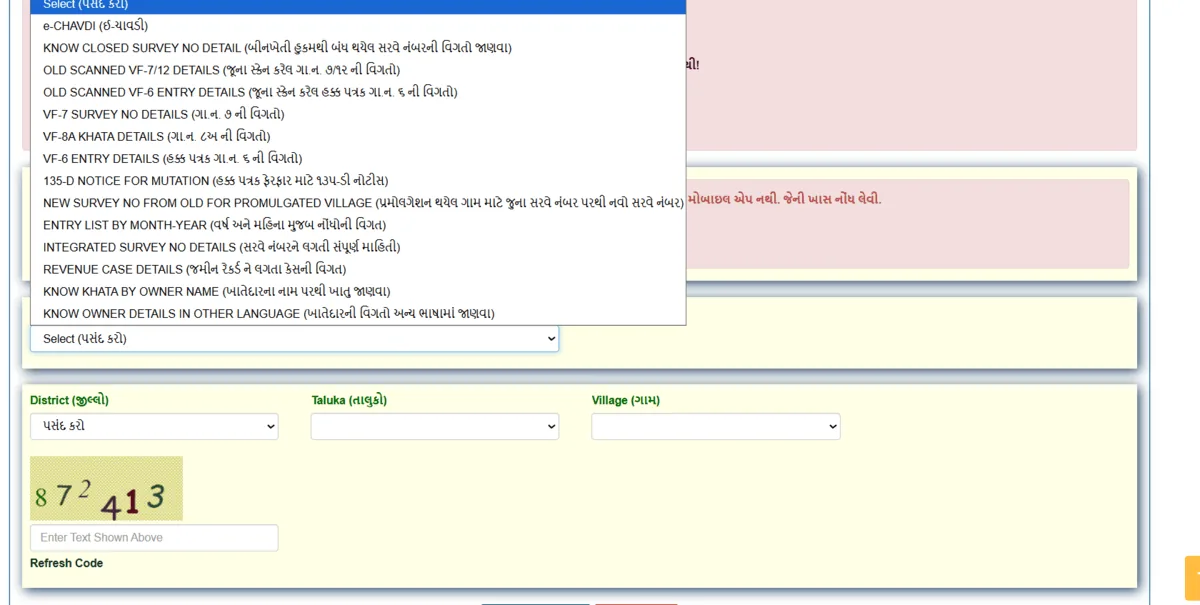
On the Rural Land Record page, find the ‘Select Option (વિકલ્પ પસંદ કરો)’ dropdown. Choose the record type you need:
- VF-7 Survey Number Details — to verify ownership, area, and land type
- VF-8A Khata Details — to see all plots held by one owner
- VF-6 Entry Details — to check the full chain of ownership transfers
- 135-D Mutation Notice — to check if a mutation is pending on that land
- Old Scanned VF-7/12 — for historical records before digitization
- Locate Khata by Owner Name — when you know the owner’s name but not the survey number
- Revenue Case Details — for checking active disputes on a survey number
If you are a first-time buyer (પ્રથમ વાર ખરીદનાર), always start with VF-7 to verify current ownership, then check VF-6 for the complete mutation history. Never skip either step.
Which Record Type Should You Select?
| Record Type | Gujarati Name | When to Use |
|---|---|---|
| VF-7 Survey Number Details | સર્વે નંબર વિગત | Verify ownership, area, land type |
| VF-8A Khata Details | ખાતા વિગત | All plots under one owner |
| VF-6 Entry Details | દાખલ-ખારિજ નોંધ | Check ownership change history |
| 135-D Mutation Notice | બદલીની નોટિસ | Check if mutation is pending |
| Old Scanned VF-7/12 | જૂની સ્કેન સાત-બાર | Historical records before digitization |
| Locate Khata by Owner Name | માલિકના નામથી ખાતા | Know name but not survey number |
| Revenue Case Details | મહેસૂલી કેસ | Active revenue disputes |
STEP 3 — Enter Location Details (સ્થળ વિગત ભરો)
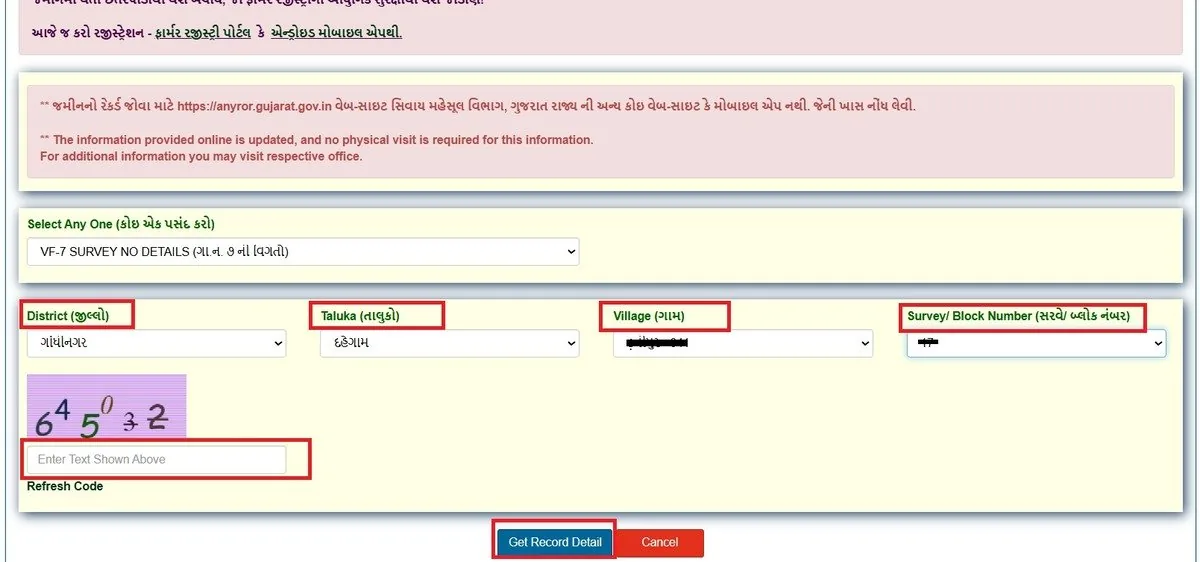
After selecting the record type, the portal will display dropdown menus. Fill in the following details carefully:
- District (જિલ્લો) — Select your district. Gujarat has 33 districts (૩૩ જિલ્લા).
- Taluka (તાલુકો) — Select your Taluka after choosing the district. The list auto-filters based on your district selection.
- Village (ગામ) — Select the exact village (ગામ) where your land is located.
- Survey / Block Number (સર્વે / બ્લોક નંબર) — Enter your survey number. Find it on your previous 7/12, sale deed (વેચાણ દસ્તાવેજ), or property tax receipt (મિલકત વેરો).
Carefully type the characters shown in the Captcha image (કેપ્ચા છબી) into the text box. Then click the 'Get Record Detail (રેકોર્ડ વિગત મેળવો)' button.
Once valid Captcha is entered, click the Get Record Detail button (shown highlighted with a red arrow on the portal).
Note: For VF-8A or 'Locate Khata by Owner Name', enter Khata Number (ખાતા નંબર) or Owner's Name (માલિકનું નામ) instead of the Survey Number.
STEP 4 — View Your Land Record Details (જમીન રેકોર્ડ વિગત જુઓ)
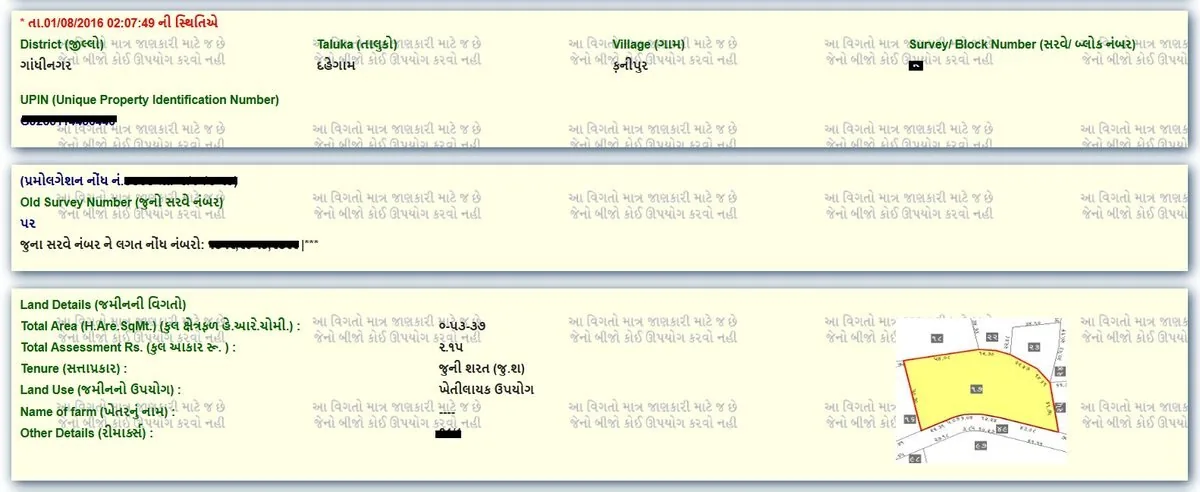
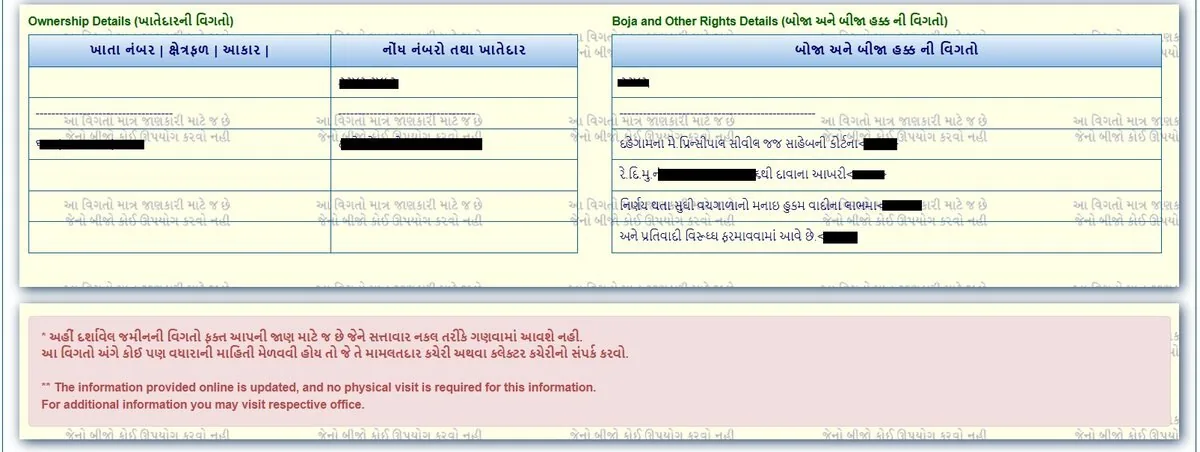
Once valid details are submitted, the land record will appear on your screen. Here is what each record type shows:
- VF-7 shows: Owner's Name (માલિકનું નામ), Survey Number (સર્વે નંબર), Total Area (કુલ વિસ્તાર), Land Type (જમીન પ્રકાર), Boja/Encumbrance (બોજો), Cultivation Details (ખેડ વિગત), Other Rights (અન્ય હક્કો).
- VF-8A shows: All Survey Numbers under that Khata (ખાતા), Total landholding area of the owner in the village.
- VF-6 shows: Entry Number (નોંધ નંબર), Reason (Sale/Inheritance/Court Order), Old and New Owner Names, and Status — Approved (મંજૂર) / Pending (પેન્ડિંગ) / Rejected (નામંજૂર).
- Old Scanned VF-7/12 shows: A results table with columns for Entry Year (નોંધ વર્ષ), Block Number, Survey/Block Number, Old Survey Number, and PDF Status — with a View PDF link to open the scanned document.
Important: Always cross-check the owner name on the record with the name on the Sale Deed (વેચાણ દસ્તાવેજ). Any mismatch is a red flag — do not proceed with the transaction without consulting an advocate.
STEP 5 — Save or Print the Record (રેકોર્ડ સેવ કરો અથવા પ્રિન્ટ કરો)
Once you have verified the land record on screen, you can save or print it for reference:
- Print: Press Ctrl+P in your browser to take a printout (પ્રિન્ટ આઉટ).
- Save as PDF: Select 'Save as PDF' in the print dialog to save the record as a PDF file on your device.
Important Legal Note: A free printout does NOT carry a digital signature (ડિજિટલ સહી). For official use — bank loans (બેંક લોન), court submissions (કોર્ટ રજૂઆત), or government applications (સરકારી અરજી) — you must download the Digitally Signed RoR (ડિજિટલી સાઇન્ડ RoR) from iora.gujarat.gov.in for just ₹5 per copy.
Key Terms Explained (મુખ્ય શબ્દો સમજાવ્યા)
One of the most common issues people face is: ‘I didn’t understand what the record was saying.’ Here is a plain-language glossary of every important term you will encounter on the AnyRoR portal:
| Term | Gujarati | Meaning |
|---|---|---|
| Survey Number | સર્વે નંબર | Unique number assigned to each land parcel by the government |
| 7/12 Utara | સાત-બાર ઉતારા | Primary land record showing owner, area, and land type |
| Khata | ખાતા | Account grouping all survey numbers under one owner |
| Mutation / Ferfar | ફેરફાર | Change of ownership recorded in VF-6 |
| Boja | બોજો | Encumbrance or charge (loan/mortgage) on the land |
| Talati | તલાટી | Village revenue officer responsible for land records |
| Jirayat | જિરાયત | Rain-fed, unirrigated agricultural land |
| Baghayat | બાગાયત | Irrigated / garden land — higher legal and market value |
| 135-D Notice | ૧૩૫-ડી નોટિસ | Public notice inviting objections to a mutation entry |
| Bhulekh | ભૂલેખ | Land record; literally "land writing" in Gujarati |
Is the AnyRoR Rural portal free to use?
A: Yes — viewing land records is completely free. You only pay ₹5 per copy for a Digitally Signed RoR (ડિજિટલી સાઇન્ડ RoR) required for official use.
Do I need to register or login to view rural land records?
A: No registration or login is needed for basic record viewing. Login is required only for downloading Digitally Signed RoR.
What is the difference between VF-7 and VF-8A?
A: VF-7 (સાત-બાર) shows details of a specific Survey Number — owner, area, land type, and encumbrances. VF-8A (ખાતા) shows ALL survey numbers held under one owner's account in a village.
Can I use a free AnyRoR printout for a bank loan?
A: No. Banks and courts require a Digitally Signed RoR (ડિજિટલી સાઇન્ડ RoR) from iora.gujarat.gov.in. The free printout is for verification purposes only.
How do I find a survey number if I don't know it?
A: Use the 'Locate Khata by Owner Name (માલિકના નામથી ખાતા)' option on the Rural Land Record page. Enter the owner's name and village to find the survey number.
What does a 135-D Notice mean on a land record?
A: A 135-D Notice (૧૩૫-ડી નોટિસ) means a mutation is in process. If it is active on a survey number you want to buy — stop. Do not proceed until the mutation is fully approved.
What is the official AnyRoR website?
A: The only official portal is anyror.gujarat.gov.in. Avoid duplicate or third-party sites that copy the interface — they may collect your personal information.
What is Boja (બોજો) on a 7/12 Utara?
A: Boja means an encumbrance — usually a bank loan or mortgage registered against the land. If Boja is shown on the 7/12, the land is pledged. Always clear Boja before buying.