
If you have recently purchased or sold a property in Gujarat, your transaction is recorded in a document maintained by the Inspector General of Registration (IGR Gujarat) — and the easiest way to access that record online is through the Index 2 (અનુક્રમણિકા-2). Whether you need it for a bank loan, a legal dispute, or simply to verify a property transaction — this page tells you exactly how to view and download your Index Copy online.
What is Index 2 (અનુક્રમણિકા-2)?
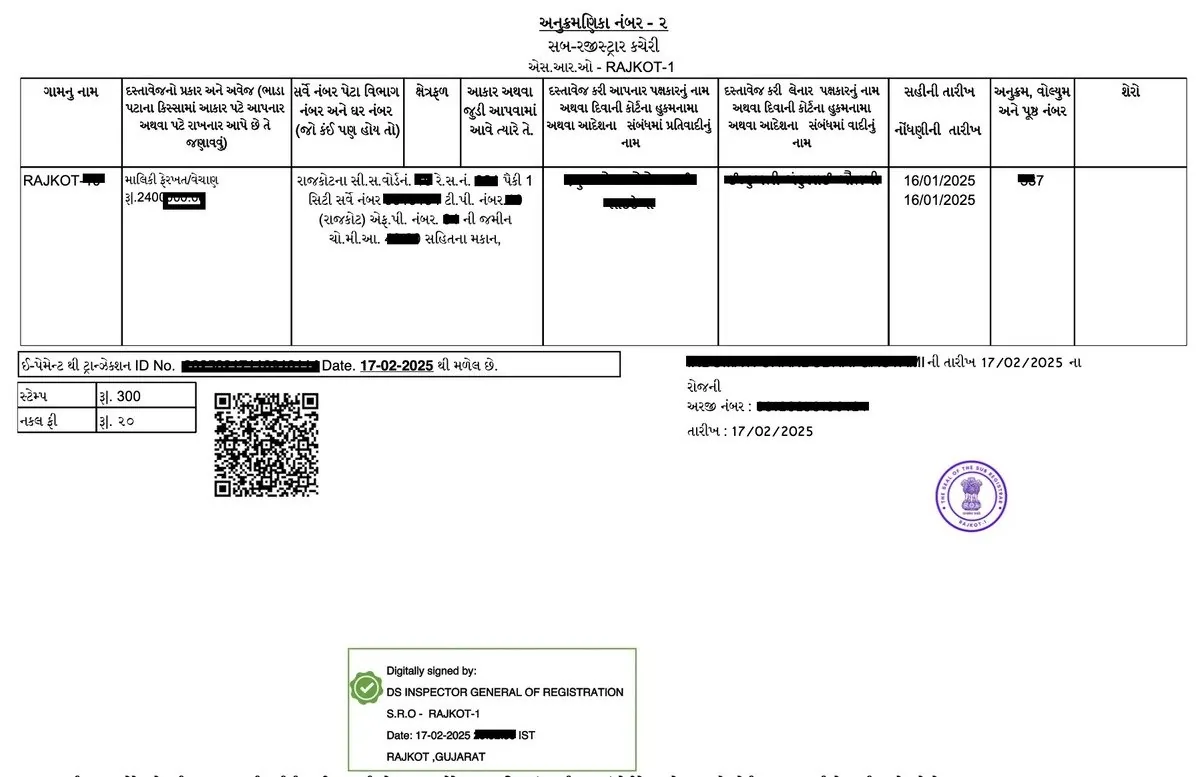
Index 2 — also written as Index-2, Index II, or Index Copy (ઇન્ડેક્સ નકલ) — is the official summary record of every property transaction (મિલ્કત વ્યવહાર) registered at a Sub-Registrar office (સબ-રજિસ્ટ્રાર કચેરી) in Gujarat. Every time a Sale Deed (વેચાણ દસ્તાવેજ), Gift Deed (ભેટ દસ્તાવેજ), Mortgage, or any other property document is registered — an Index 2 entry is automatically generated. Think of Index 2 as the registration receipt of your property transaction. It contains the document number (દસ્તાવેજ નંબર), registration year (નોંધણી વર્ષ), party names, property description, and stamp duty paid — all extracted from the registered deed.
Why Do You Need an Index Copy (ઇન્ડેક્સ નકલ)?
Here are the most common situations where an Index 2 copy is legally required or practically essential:
- Verify a Property Transaction (મિલ્કત વ્યવહાર): Before buying any property, check if the seller’s previous purchase deed is registered and the details match.
- Bank Loan & Mortgage (બેંક લોન / ગીરો): Banks require Index 2 to verify the chain of title (હક્ક-સાંકળ) and confirm that all previous transactions are properly registered.
- Legal Disputes & Court Submissions (કોર્ટ): Index 2 is admissible as documentary evidence of registration in civil suits (સ.ક.) and land tribunals.
- Property Mutation (ફેરફાર): Revenue Department requires proof of registration — Index 2 serves as that proof when updating land records.
- NRI Property Verification: Non-resident Gujaratis can verify their Gujarat property transactions remotely through the gARVI portal without visiting India.
- Duplicate Deed Loss: If the original sale deed is lost, the Index 2 copy serves as a secondary proof of the transaction details.
Method 1 — View Index 2 Directly on gARVI Portal
The quickest way to check an Index 2 online (ઇન્ડેક્સ-2 ઑનલાઇન) is through the gARVI 2.0 portal (garvi.gujarat.gov.in) — the official property registration portal of the Inspector General of Registration (IGR Gujarat). This route is free, requires no login, and shows the Index 2 details instantly.
STEP 1 — Open gARVI Portal and Navigate to Index-2 Details
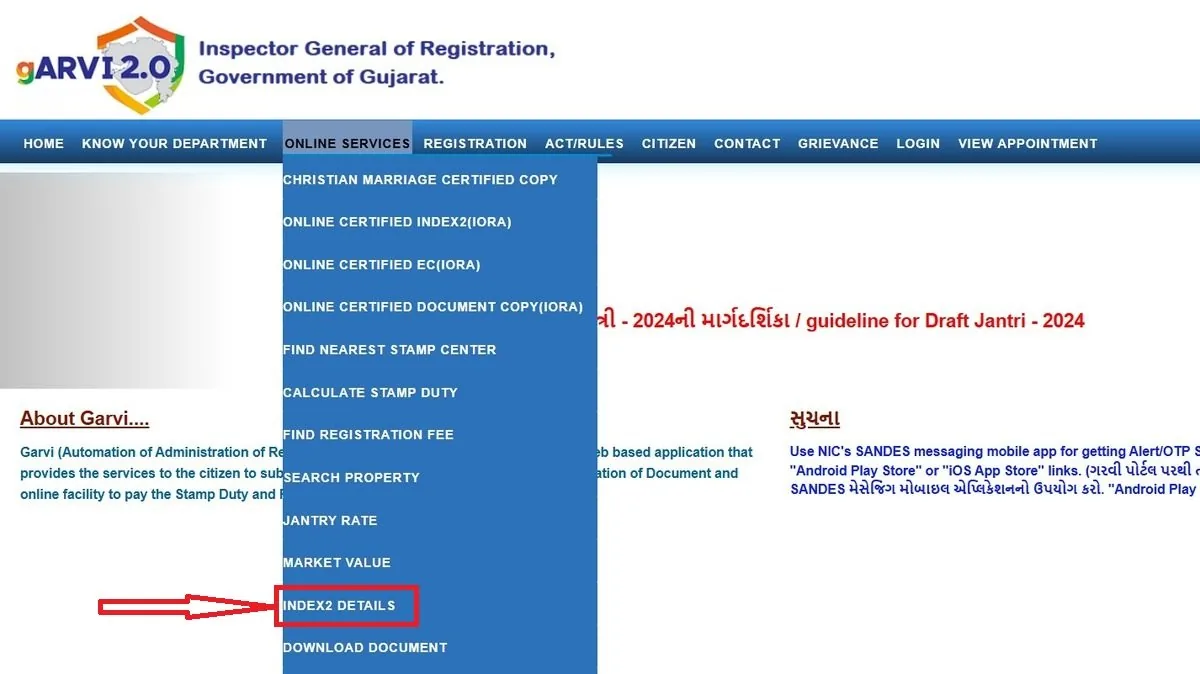
Open your browser and go to: garvi.gujarat.gov.in On the homepage, click View Index-2 Details (અનુક્રમણિકા-2 નકલ ની વિગત) from the main menu. The page heading will show: “Index-2 Details (અનુક્રમણિકા-2 નકલ ની વિગત)” — confirming you are in the right section.
STEP 2 — Fill In Property Details
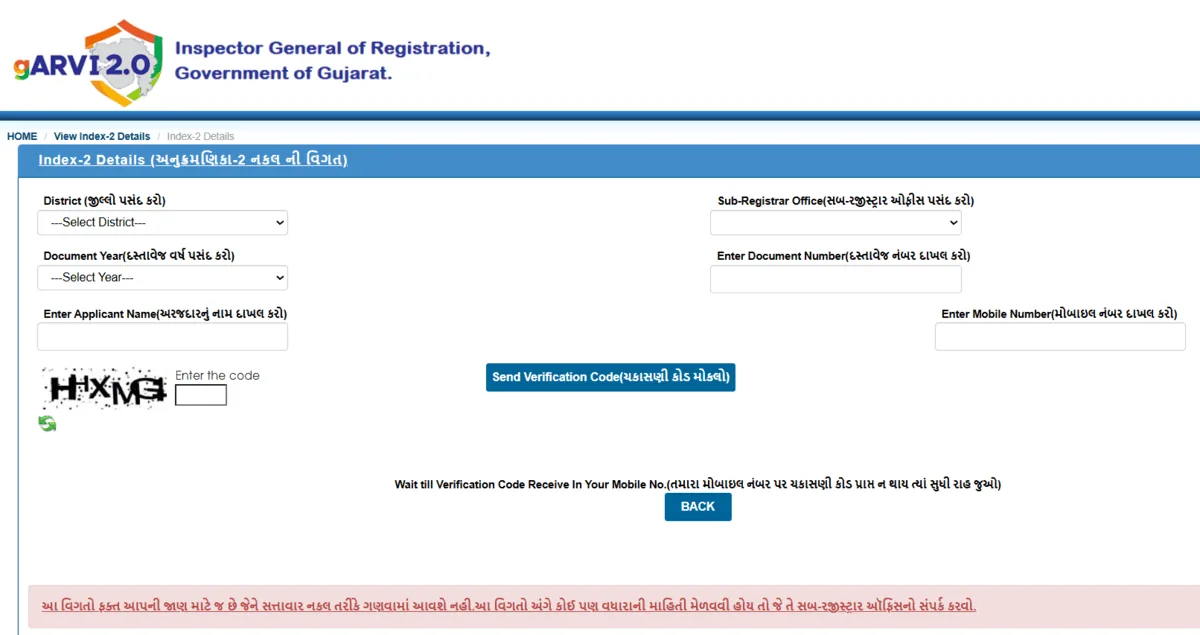
On the Index-2 search form, fill in the following fields carefully:
| Field (ક્ષેત્ર) | Gujarati Label | What to Enter |
|---|---|---|
| District | જિલ્લો પસંદ કરો | Select your district from dropdown |
| Sub-Registrar Office | સબ-રજિસ્ટ્રાર ઓફિસ પસંદ કરો | Select the Sub-Registrar office where deed was registered |
| Document Year | દસ્તાવેજ વર્ષ પસંદ કરો | Select the year the document was registered |
| Document Number | દસ્તાવેજ નંબર દાખલ કરો | Enter the document registration number |
| Applicant Name | અરજદારનું નામ દાખલ કરો | Enter your name (for OTP verification) |
| Mobile Number | મોબાઇલ નંબર દાખલ કરો | Enter active mobile number to receive OTP |
STEP 3 — Solve Captcha and Send Verification Code
Enter the alphanumeric Captcha code shown on screen. Then click Send Verification Code (યકાસણી કોડ મોકલો). Wait for the OTP to arrive on your registered mobile number. Enter the OTP and click Submit to view the Index 2 details on screen.
Method 2 — Apply for Certified Index Copy via iORA Portal
If you need an officially certified, downloadable Index 2 copy (ઇન્ડેક્સ-2 ની નકલ) — for court submissions, bank loan processing, or mutation applications — you must apply through the iORA portal (Integrated Online Revenue Applications) at iora.gujarat.gov.in. The gARVI view is for verification only; the iORA route gives you an official copy with fee payment and Application Number (અરજી ક્રમાંક).
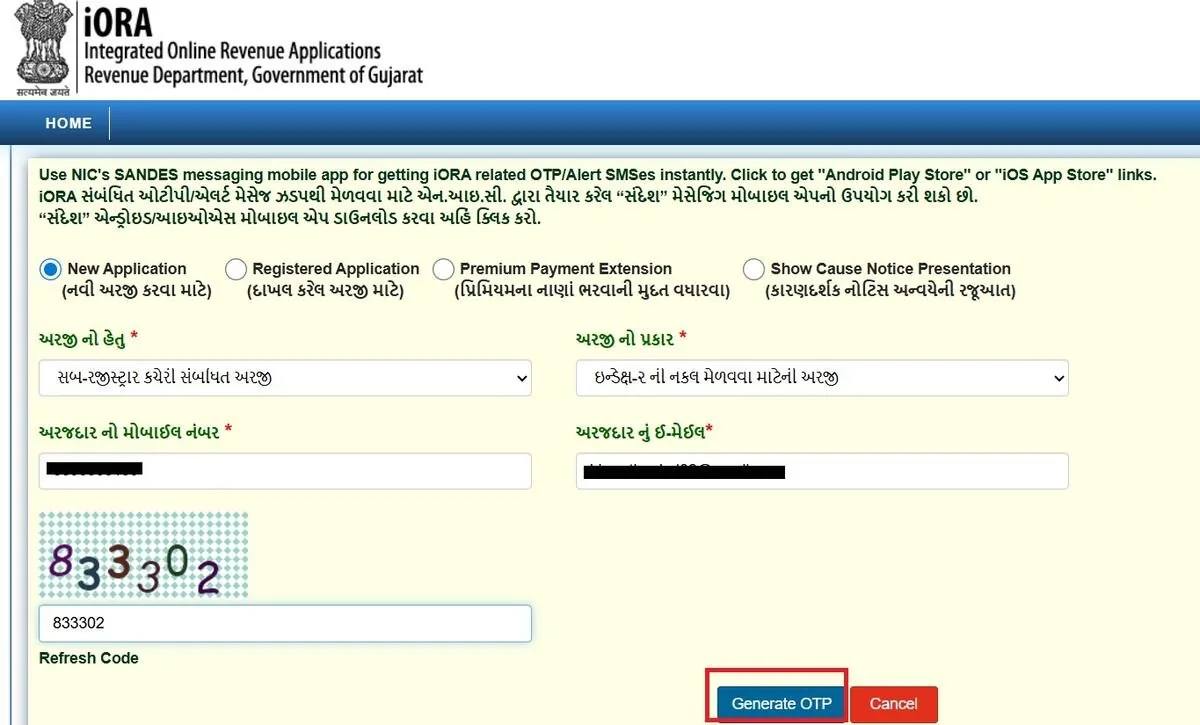
STEP 1 — Open iORA and Select New Application (નવી અરજી)
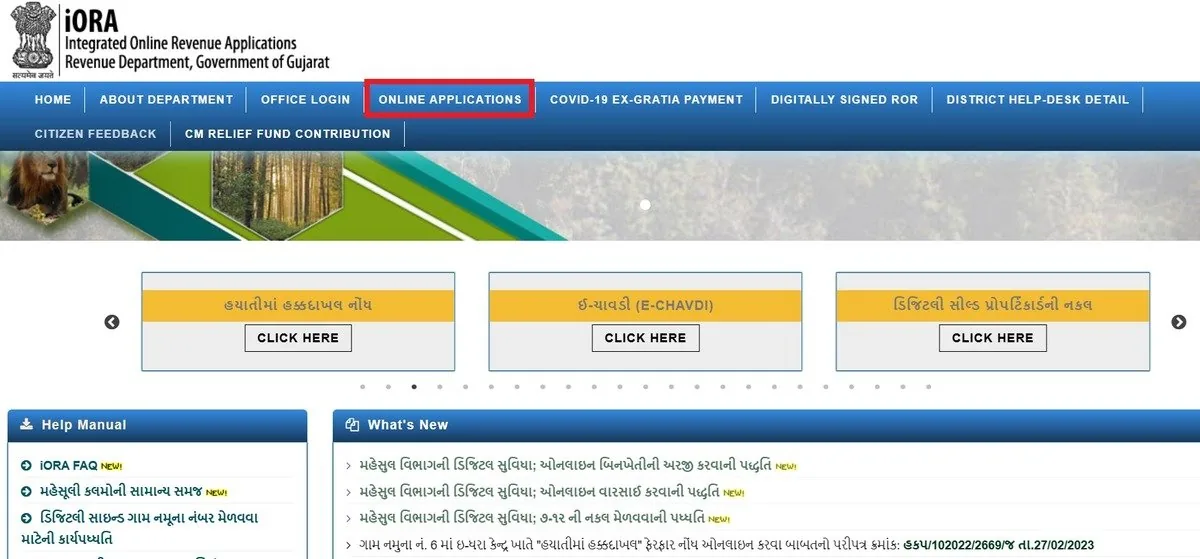
Go to iora.gujarat.gov.in and click Online Applications from the top menu. Select New Application (નવી અરજી કરવા માટે) — the first radio button option on the application page.
STEP 2 — Select Purpose and Application Type
From the અરજી નો હેતુ (Purpose of Application) dropdown, select: “સબ-રજિસ્ટ્રાર કચેરી સંબંધિત અરજી” (Sub-Registrar Office related application). Then from the અરજી નો પ્રકાર (Application Type) dropdown, select: “Index 2 ની નકલ મેળવવા માટેની અરજી” (Application for obtaining Index 2 copy). Then select your District (જિલ્લો), Taluka (તાલુકો), and Sub-Registrar Office (સબ-રજિસ્ટ્રાર કચેરી).

STEP 3 — Enter Mobile, Email, OTP and Open Application Form
Enter your અરજદાર નો મોબાઇલ નંબર (Mobile Number) and અરજદાર નું ઈ-મેઈલ (Email ID). Solve the Captcha and click Generate OTP. Enter the OTP received on both your mobile and email, then click Submit. The application form will open — fill in your Applicant Name (અરજદાર નામ), Address (સરનામું), Document Number (દસ્તાવેજ નો નંબર), and Document Registration Year (દસ્તાવેજ નોંધાયેલ વર્ષ). Then click Search to find the document.
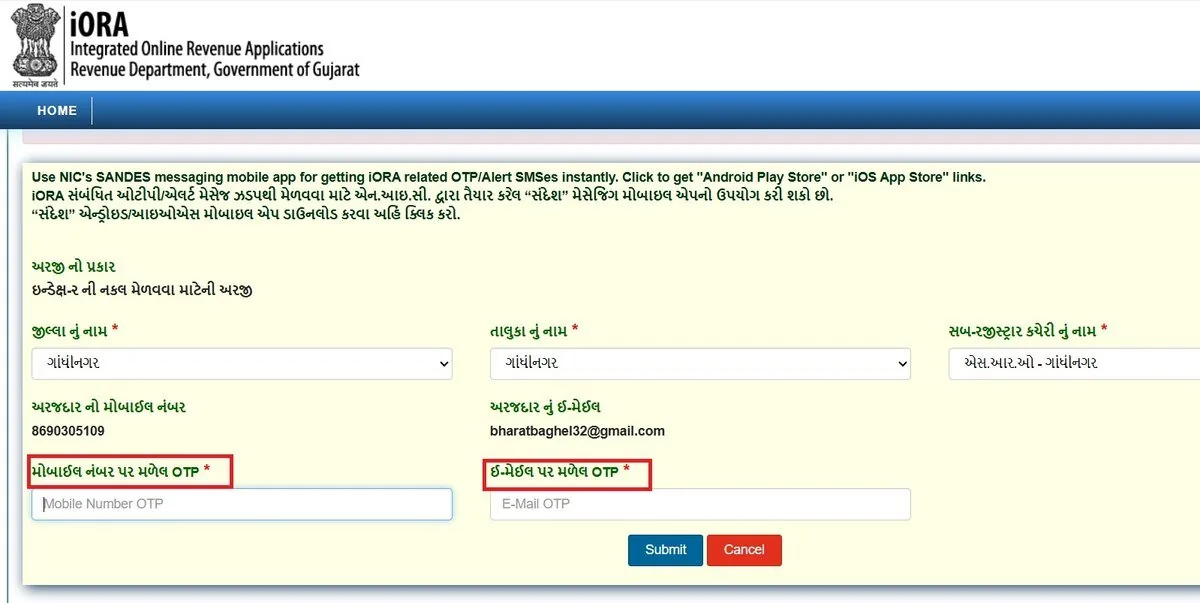
STEP 4 — Verify Document, Add, and Save Application
After clicking Generate OTP, the portal loads the next screen. Here you will see your અરજી નો પ્રકાર (Application Type) already confirmed as: “ઇન્ડેક્સ-ર ની નકલ મેળવવા માટેની અરજી”
Now fill in the following details:
Location Details (સ્થળની વિગતો):
- જિલ્લા નું નામ (District Name) — Select your district from the dropdown (e.g. ગાંધીનગર)
- તાલુકા નું નામ (Taluka Name) — Select your taluka (e.g. ગાંધીનગર)
- સબ-રજિસ્ટ્રાર કચેરી નું નામ (Sub-Registrar Office Name) — Select the correct SRO where your document was originally registered (e.g. એસ.આર.ઓ – ગાંધીનગર)
Your contact details — Mobile Number (અરજદાર નો મોબાઇલ નંબર) and Email (અરજદાર નું ઈ-મેઈલ) entered in the previous step will be displayed here for confirmation.
OTP Verification (OTP ચકાસણી):
You will receive two separate OTPs — one on your mobile and one on your email:
- મોબાઇલ નંબર પર મળેલ OTP — Enter the OTP received on your mobile number
- ઈ-મેઈલ પર મળેલ OTP — Enter the OTP received on your email ID
Once both OTPs are entered, click Submit to open the full application form.
💡 Pro Tip: Both OTPs arrive almost simultaneously. If you don’t receive the email OTP, check your Spam/Junk folder before requesting a new one.
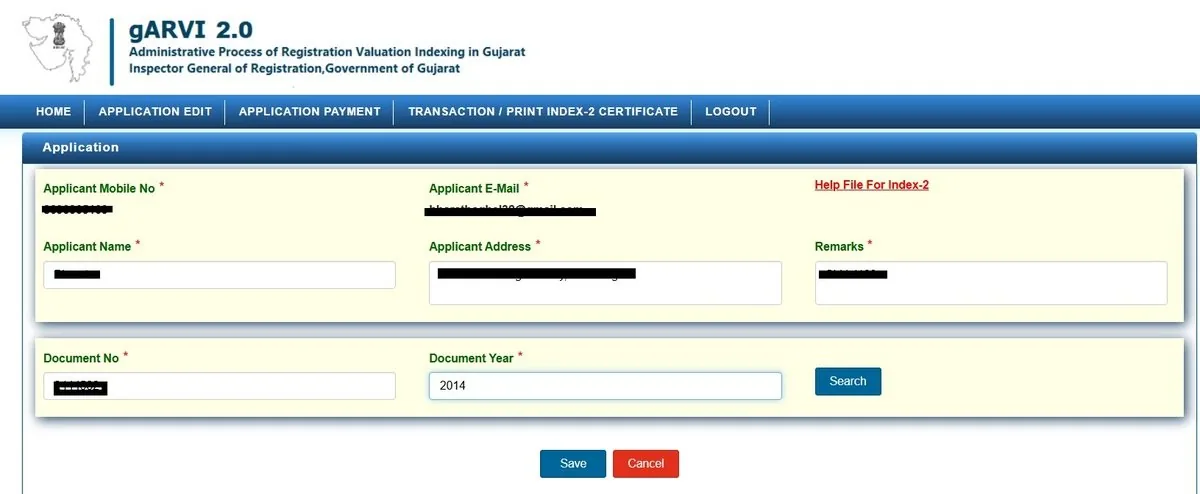
STEP 5 — Fill Application Form (gARVI 2.0)
After OTP verification, the portal redirects you to gARVI 2.0. Fill in the following details:
Personal Details:
- Applicant Name — Your full name
- Applicant Address — Your complete address
- Remarks — Purpose note (e.g. “For Bank Loan”)
Document Details:
- Document No (દસ્તાવેજ નંબર) — Enter your property deed number
- Document Year (દસ્તાવેજ વર્ષ) — Year of registration (e.g. 2014)
Click Search to find your document.
⚠️ Document Number and Year must exactly match your original sale deed (વેચાણ દસ્તાવેજ).
STEP 6 — Verify, Pay & Download Index 2 Copy
Once your document appears in search results, verify the details and click Add. You can add multiple documents in a single application.
Click Save — the system instantly generates your Application Number (અરજી ક્રમાંક). Note it for future reference.
The portal auto-calculates the total fee including Application Fee + Index 2 Fee + Copy Fee. Click Application Payment to proceed.
Payment is processed through Gujarat Cyber Treasury via Net Banking or Payment Gateway.
After successful payment, go to Transaction / Print Index-2 Certificate tab and download your certified Index 2 copy.
✅ This digitally certified copy is legally valid for court submissions, bank loan processing, and mutation applications (બદલી અરજી).
Fee Structure for Index 2 Copy (ઇન્ડેક્સ-2 ફી)
Fees are auto-calculated by the iORA portal based on the number of copies requested. Here is a breakdown of the three fee components:
| Fee Component | Gujarati Term | Details |
|---|---|---|
| Application Fee (અરજી ફી) | અરજી ફી | Fixed flat fee per application — charged once regardless of number of copies |
| Index 2 Fee (Stamp/Court Fee) | ઇન્ડેક્સ-2 ની ફી | Charged per document — based on stamp duty category |
| Copy / Folio Fee (નકલ ફી) | નકલ / ફોલિઓ ફી | Charged per page/folio of the Index 2 copy |
| Total (કુલ ફી) | કુલ રકમ | Automatically calculated and displayed before payment |
| View Only on gARVI | ઓનલાઇન જોવા | Free — no payment required to view Index 2 on garvi.gujarat.gov.in |
Key Terms Explained (મુખ્ય શબ્દો)
| Term | Gujarati | Meaning |
|---|---|---|
| Index 2 / Index Copy | અનુક્રમણિકા-2 / ઇન્ડેક્સ નકલ | Official summary record of a registered property document at Sub-Registrar office |
| Document Number | દસ્તાવેજ નંબર | Unique serial number assigned to your deed at time of registration |
| Document Year | દસ્તાવેજ વર્ષ / નોંઘણી વર્ષ | The calendar year in which the deed was registered |
| Sub-Registrar Office | સબ-રજિસ્ટ્રાર કચેરી | Government office where property documents are registered |
| IGR Gujarat | IGR ગુજરાત | Inspector General of Registration — the authority overseeing all property registrations |
Frequently Asked Questions (વારંવાર પૂછાતા પ્રશ્નો)
What is Index 2 (અનુક્રમણિકા-2) in Gujarat?
Index 2 is an official summary record (સારાંશ દસ્તાવેજ) of a registered property transaction (મિલ્કત વ્યવહાર) maintained by the Sub-Registrar Office (સબ-રજિસ્ટ્રાર કચેરી). It includes details like document number (દસ્તાવેજ નંબર), party names (પક્ષકારોના નામ), and property details (મિલ્કતની માહિતી).
Why is Index 2 (ઇન્ડેક્સ-2) important for property verification (મિલ્કત ચકાસણી)?
Index 2 helps you verify whether a property transaction (મિલ્કત વ્યવહાર) is legally registered (કાયદેસર નોંધાયેલ). It is useful to check ownership history (માલિકીની માહિતી) and avoid fraud (છેતરપિંડી ટાળવા).
Can I check Index 2 online (ઇન્ડેક્સ-2 ઑનલાઇન)?
Yes, you can view Index 2 details (વિગતો) online through the official portal (અધિકૃત પોર્ટલ). For a certified copy (પ્રમાણિત નકલ), you need to apply through iORA (આઈઓઆરએ) and pay the required fee (ફી).
Is Index 2 required for bank loan (બેંક લોન) and legal work (કાનૂની કામ)?
Yes, Index 2 is accepted as a supporting document (સહાયક દસ્તાવેજ) by banks (બેંકો) and courts (કોર્ટ). It is commonly used for loan approval (લોન મંજૂરી), legal disputes (કાનૂની વિવાદ), and mutation (ફેરફાર).
What details are needed to search Index 2 (ઇન્ડેક્સ-2 શોધવા માટે)?
To search Index 2, you need document number (દસ્તાવેજ નંબર), registration year (નોંધણી વર્ષ), and Sub-Registrar office details (સબ-રજિસ્ટ્રાર કચેરીની માહિતી).
What if my original sale deed (મૂળ વેચાણ દસ્તાવેજ) is lost?
If your original sale deed is lost (ગુમ થઈ જાય), Index 2 can be used as supporting proof (પુરાવા તરીકે). You can also apply for a certified copy (પ્રમાણિત નકલ) online.
Does Index 2 prove ownership (માલિકીનો પુરાવો)?
Index 2 confirms registration (નોંધણીની પુષ્ટિ કરે છે), but it is not a full ownership proof (પૂર્ણ માલિકીનો પુરાવો નથી). The original sale deed (મૂળ દસ્તાવેજ) is required for complete ownership verification (પૂર્ણ ચકાસણી).