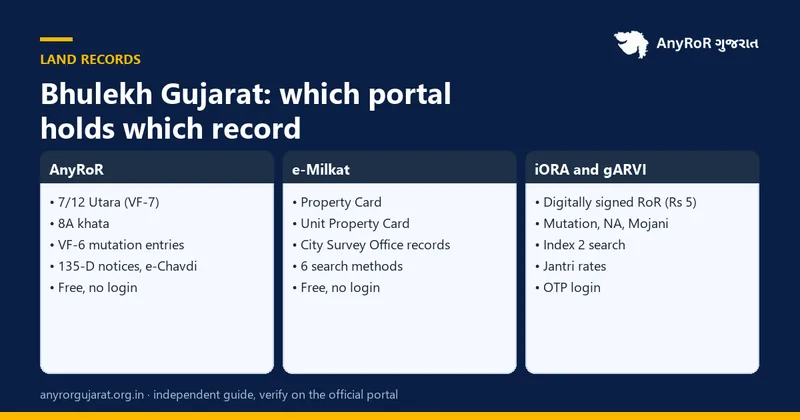
"Bhulekh Gujarat" is just another name for the state's online land records. Gujarat does not run a separate Bhulekh website: the records live on AnyRoR (anyror.gujarat.gov.in) for villages, e-Milkat for city property cards, iORA for digitally signed copies and applications, and gARVI for registered documents. This guide maps every "Bhulekh" search to the right Gujarat portal, including the village map (gaam nakasho), which is the one piece most people cannot find.
Type "Bhulekh Gujarat" into Google and you get a confusing mix: portals from Uttar Pradesh and Odisha, third-party apps, and a few pages that quietly point back to AnyRoR. The confusion is understandable. Bhulekh (ભૂલેખ) is a Hindi word, bhu (land) plus lekh (record), that several states adopted as the brand name for their land record websites. Gujarat never did. It built its own set of portals with their own names, and each one holds a different slice of the record.
This article is the missing map. It explains what people mean by Bhulekh Gujarat, which portal answers which question, how to run the 5 most common searches, and where to get the village map and field measurement sheet that no land record website shows. If you already know your way around AnyRoR, jump to the map section; it is the part that fills the gap.
What Bhulekh means, and why Gujarat uses different names
Every Indian state keeps three layers of land information: the record of rights (who holds what), the cadastral map (where the plot is and how big), and the registration record (which documents changed hands). States such as Uttar Pradesh, Bihar, Odisha and Uttarakhand put the first layer on a site called Bhulekh, the second on Bhu Naksha and the third on a registration department portal. Gujarat digitised the same layers a decade earlier under the e-Dhara project and kept the Gujarati names:
So when a Gujarati speaker says "satbara" and a Hindi speaker says "bhulekh", they want the same document: the 7/12 Utara. The rest of this guide uses the Gujarat names and tells you which one to open.
Which portal answers which question
| You want to | Record | Portal | Cost |
|---|---|---|---|
| See who owns a village survey number | VF-7 (7/12 Utara) | AnyRoR → View Land Record - Rural | Free |
| See every plot one person holds in a village | VF-8A (khata) | AnyRoR → View Land Record - Rural | Free |
| Read the history of a change (sale, inheritance, loan) | VF-6 mutation entry | AnyRoR → Mutation Entry Details | Free |
| See pending changes for a whole village | 135-D notices | AnyRoR → e-Chavdi | Free |
| Check a flat, shop or city plot | Property Card / Unit Property Card | e-Milkat | Free |
| Get a copy a bank or court accepts | Digitally signed 7/12, 8A, 6 | iORA → Digitally Signed RoR | ₹5 per copy |
| Check whether a sale deed was registered | Index 2 | gARVI → Index-2 search | Free to view |
| See the government value of the land | Jantri (ASR) | gARVI → Jantri | Free |
| Get the plot boundary map | Village map, FMS, re-survey map | DILR office / iORA measurement application | Fee applies |
The first four rows are covered in depth in our rural land record guide; the fifth in the urban land record and Property Card guides; and the Index 2 row in the Index 2 guide. Below are the short versions, so this page works as a single reference.
Search 1: 7/12 Utara by survey number
This is the "Bhulekh" search most people mean. Open anyror.gujarat.gov.in, click View Land Record - Rural, choose VF-7 Survey No. Details, select the district, taluka and village, type the survey or block number, solve the captcha and click Get Record Detail. The screen shows the holder names, area, tenure, encumbrances and the latest entry numbers.
Two habits save time. First, the dropdowns are in Gujarati alphabetical order, so learn the first letter of your village in Gujarati. Second, if a survey number returns nothing, try the block number: villages that went through consolidation (એકત્રીકરણ) use block numbers as the working identifier. Our 7/12 reading guide explains what each column means once the record is on screen.
Search 2: all land held by one person (VF-8A)
Choose VF-8A Khata Details on the same screen and enter the khata (account) number. If you do not know it, use Know Khata by Owner Name: pick the village, type the first letters of the name in Gujarati, and choose the right person from the list. The 8A lists every survey number in that account with the area of each, which is how you check that a seller is not leaving out part of a joint family holding.
Search 3: mutation entries and 135-D notices
VF-6 Entry Details shows the full text and status of a numbered entry; 135-D Notice Details shows the objection notice for a pending entry. Both take the village plus the number. If you only know roughly when a change happened, use Entry List by Month-Year to list every entry created in that village that month, or watch the village through e-Chavdi. The mutation guide explains how an entry moves from pending to certified.
Search 4: city property on e-Milkat
Land inside municipal limits is not in the village forms at all. It sits with the City Survey Office as a Property Card (for plots) or a Unit Property Card (for flats and shops). On AnyRoR choose View Land Record - Urban, pick the card type, then one of 6 search methods: survey number, nondh number, 135-D notice, owner name, month-year entry list or UPIN. District, City Survey Office, ward and sheet number complete the search. If you are buying a flat in Ahmedabad, Surat, Vadodara or Rajkot, this is your Bhulekh.
Search 5: registered documents and Index 2 on gARVI
The land record tells you who the revenue department thinks holds the land. The registration record tells you what was actually signed and stamped. On garvi.gujarat.gov.in the Index-2 search lets you look up registered documents by property, party name or document number, after an OTP. A recent sale deed that has not yet reached the 7/12 through mutation will show here first, which is why serious buyers run both searches.
The village map (gaam nakasho) and field measurement sheet
This is where Gujarat differs from states with a Bhu Naksha site, and where most "Bhulekh Gujarat" articles go quiet. The public AnyRoR screens show the record of a survey number but not its drawing. The drawing exists in 2 forms:
- Village map (ગામ નકશો): the cadastral sheet showing every survey number in the village with roads, streams and boundaries.
- Field measurement sheet (FMS, માપણી શીટ): the individual plot sketch with side lengths and the tippan (measurement book) references, used to re-mark boundaries on the ground.
Both are kept by the District Inspector of Land Records (DILR) under the Settlement Commissioner. There are 3 ways to get them:
- Apply at the DILR or taluka office for a certified copy of the village map or FMS, quoting the survey number. A nominal copying fee applies and the copy carries an official stamp.
- Apply for land measurement (Mojani, મોજણી) through iORA. If you need the boundary marked physically, for example before a fence or a sale of part of a plot, the iMojani service on iora.gujarat.gov.in takes the application and fee online; a surveyor then measures the plot and issues a measurement sheet.
- Re-survey maps. Villages covered by Gujarat's re-survey have new digital maps, and the promulgated (final) sheets are progressively being linked to records. Where a re-survey map exists, the DILR office can supply it; if you find a discrepancy between the old and new area, the office also handles correction applications.
Old land records and historical copies
The online 7/12 shows the current position and the entry numbers behind it. If you need the position as it stood in, say, 1985, for a court case or a family settlement, apply for a certified copy of the old record (જૂનો રેકોર્ડ) at the taluka Mamlatdar office or the district record room. Older village forms were kept in registers and are scanned in many districts, but not all are online. Quote the survey number, the village and the approximate years, and expect a few days for retrieval.
Mobile apps and third-party sites: what is safe
Gujarat's Revenue Department does not, at the time of writing, publish an official "Bhulekh Gujarat" or AnyRoR mobile app. Apps in the stores with those names are third-party wrappers that load the government pages inside the app and often show advertising. They can be convenient, but they see everything you type. Prefer the official sites in a browser, check that the address ends in gujarat.gov.in, and never pay anyone for a "record" that the portal shows for free.
Common mistakes people make with Bhulekh searches
- Searching a city flat on the rural screen. Municipal property lives on e-Milkat. If the village dropdown does not list your locality, you are on the wrong screen.
- Trusting the name column alone. The holder column can lag a registered sale by weeks. Cross-check Index 2.
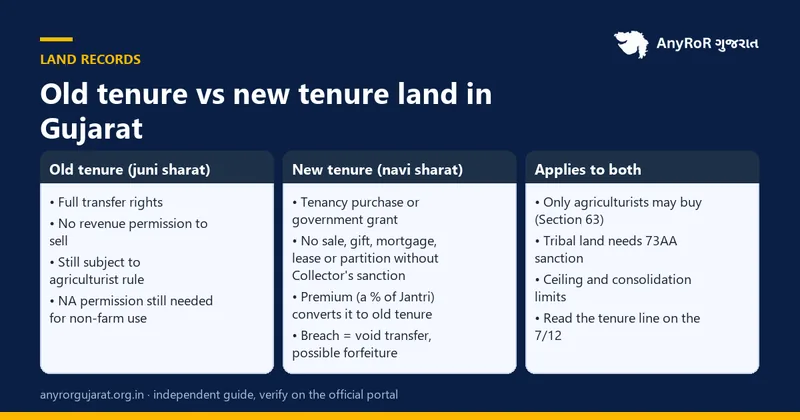
- Ignoring the tenure line. New-tenure (નવી શરત) land cannot be sold without permission; a Bhulekh lookup that skips this line is incomplete.
- Using an old survey number. After consolidation the block number is what the portal expects.
- Using a screenshot as proof. Banks and sub-registrars want the ₹5 digitally signed copy from iORA, which carries a verifiable signature.
Putting it together: a 10-minute land check
- AnyRoR VF-7: holder names, area, tenure, encumbrances.
- AnyRoR VF-8A: the seller's full holding in the village.
- AnyRoR VF-6 and 135-D: any pending entries.
- gARVI Index 2: registered deeds on the property in the last 12 years.
- gARVI Jantri: the government value, to budget stamp duty (see the Jantri guide).
- DILR: village map or FMS for the boundary.
- iORA: a digitally signed 7/12 for the file.
Frequently asked questions (વારંવાર પૂછાતા પ્રશ્નો)
Is there an official Bhulekh Gujarat website?
No. Gujarat's land records are on AnyRoR (anyror.gujarat.gov.in) for villages and e-Milkat for city property, with iORA for certified copies and gARVI for registered documents. Sites that call themselves "Bhulekh Gujarat" are third-party pages that link to these portals.
Is Bhulekh the same as 7/12 Utara?
In practice, yes. Bhulekh is the Hindi word for a land record; 7/12 Utara is the Gujarat document that records a survey number's holders (Village Form 7) and crops (Village Form 12). When someone asks for the Bhulekh of Gujarat land, the 7/12 is what they want.
How do I see the map of my survey number in Gujarat?
Apply to the District Inspector of Land Records (DILR) or the taluka office for a certified copy of the village map or the field measurement sheet, or apply for land measurement (Mojani) through iORA if you need the boundary marked on the ground. The public AnyRoR screens do not display plot maps.
Can I check Gujarat land records by owner name?
Yes. On the rural screen use "Know Khata by Owner Name" to find the account, then open the VF-8A. On the urban e-Milkat screen choose "Know Survey No. by Owner Name". Type the name in Gujarati as it appears on documents.
Is checking land records on AnyRoR free?
Viewing is free and needs no login. A digitally signed copy from iORA costs ₹5 per copy at the time of writing. Certified copies of maps and old records carry small office fees.
Why does the 7/12 still show the previous owner after a sale?
Because the mutation entry for the sale has not been certified yet, or was never applied for. Registration at the Sub-Registrar office does not update the land record by itself; the buyer must apply for mutation at the e-Dhara Kendra or on iORA.
What is the difference between AnyRoR and e-Dhara?
e-Dhara is the Revenue Department's computerisation project and the name of the taluka centres where records are updated. AnyRoR is the public website that displays the records maintained under e-Dhara.
Do I need a login or Aadhaar to search?
Viewing records on AnyRoR and e-Milkat needs only a captcha. Some gARVI and iORA services ask for a mobile OTP. None of the official view screens ask for Aadhaar or a payment.
Can NRIs check Gujarat land records from abroad?
Yes. The portals are public and work from any country. The only friction is OTP-based services, which send codes to Indian mobile numbers; keep an Indian SIM active or ask a family member to complete OTP steps.