
Property Card Gujarat — View & Download Property Card Online (મિલ્કત કાર્ડ)
If you own a flat, shop, or plot inside a city or town in Gujarat — your Property Card (મુળ કાર્ડ) is the most important leal document you need to verify before any property transaction. It is maintained by the City Survey Office (સીટી સર્વે ઓફિસ) under the Revenue Department of Gujarat and is publicly accessible, free of charge, at e-milkat.gujarat.gov.in.
This guide walks you through exactly how to view and download a Property Card online — what each section means, which card type to select, and what to look for before you sign any agreement.
What is a Property Card (મુળ કાર્ડ) in Gujarat?
A Property Card — also called Mul Card (મુળ કાર્ડ) — is the official urban land record maintained by the Gujarat Revenue Department for properties located within municipal limits (નગરપાલિકા હદ). Think of it as the urban equivalent of the 7/12 Utara (સાત-બાર ઉતારા) used for rural agricultural land.
Every flat, shop, bungalow, commercial plot, or residential unit within a city or town in Gujarat is covered under the Property Card system. The card records the original grant of the land, the current legal owner, the land area, Town Planning details, court cases, tax dues, and the government’s benchmark value — the Jantri (જંત્રી).
There are two types of cards: the Property Card (મુળ કાર્ડ) for full plots and independent properties, and the Unit Property Card (એકમ કાર્ડ) for individual flats, shops, or units within a housing society. Choosing the wrong card type is one of the most common mistakes first-time buyers make — more on that below.
How to View & Download Property Card Online — Step-by-Step
Viewing a Property Card on e-milkat.gujarat.gov.in is completely free. No registration or login is required for basic access. Follow these steps exactly.
STEP 1 — Go to the Official Portal (સત્તાવાર પોર્ટલ પર જાઓ)
Open your browser and visit the official Urban Land Record portal: e-milkat.gujarat.gov.in — or navigate from the main AnyRoR homepage at anyror.gujarat.gov.in and click ACCESS LAND RECORD – URBAN.
You can also use the direct link: https://e-milkat.gujarat.gov.in/GeneralReport.aspx
Important: Always verify the URL ends in gujarat.gov.in. Third-party sites copy the interface but may steal your personal information.
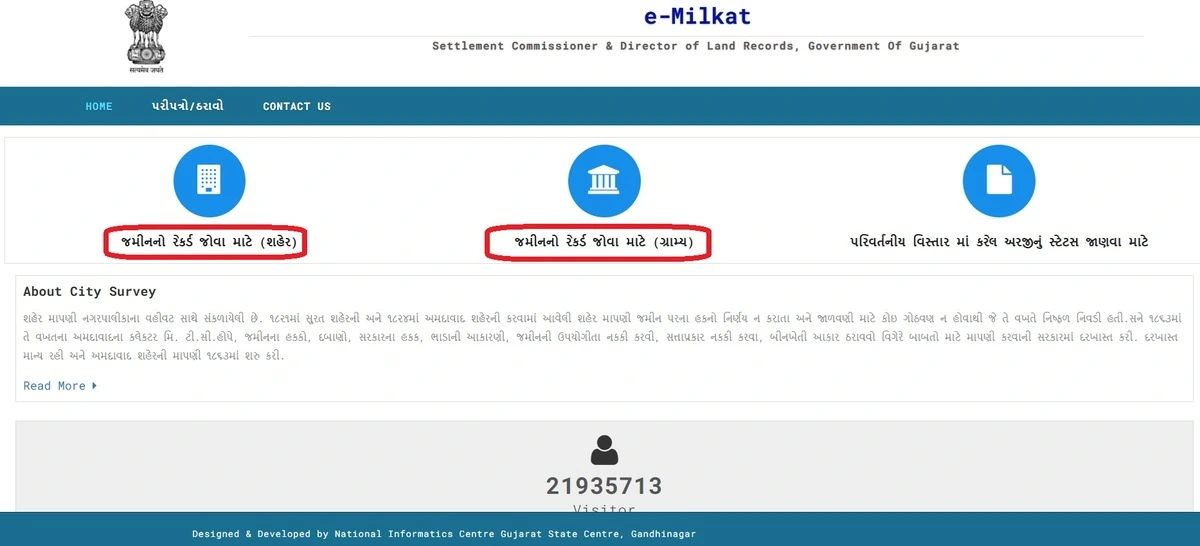
STEP 2 — Select Card Type — Property Card or Unit Property Card
At the top of the page, you will see two radio button options:
Property Card (મુળ કાર્ડ) — Select for plots, bungalows, or commercial properties.
Unit Property Card (એકમ કાર્ડ) — Select for flats, shops, or units in a housing society.
If you are buying a flat in Ahmedabad, Surat, or Gandhinagar — always choose Unit Property Card (એકમ કાર્ડ). For independent properties, select Property Card (મુળ કાર્ડ).
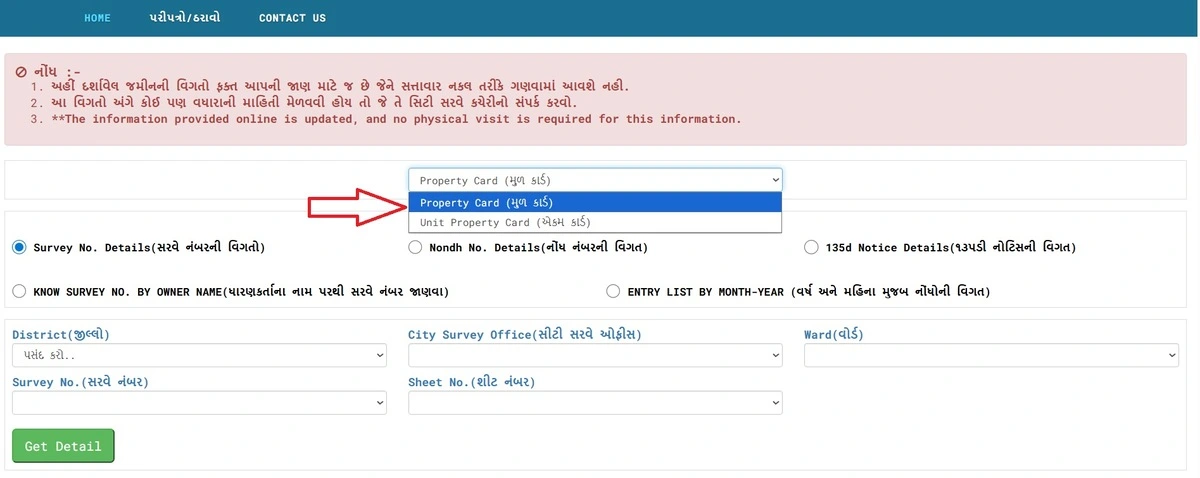
STEP 3 — Choose Your Search Method (શોધ પ્રકાર પસંદ કરો)
From the 'Select Any One (કોઈ એક પસંદ કરો)' dropdown, choose one of the following six search methods:
Survey No. Details (સર્વે નંબરની વિગત) — Most common. Use when you have the survey number.
Nondh No. Details (નોંધ નંબરની વિગત) — Use when you have the mutation/entry number from a previous transaction.
135D Notice Details (૧૩૫ડી નોટિસ) — Check if a mutation is currently in process.
Know Survey No. by Owner Name (માલિકના નામ પરથી) — Use when you know the owner's name but not the survey number.
Entry List by Month-Year (વર્ષ-મહિના મુજબ) — See all mutations in a ward during a specific month.
Know Survey No. by UPIN (UPIN પરથી) — Use the Unique Property Identification Number for precise record retrieval.
If you have the survey number — always start with Survey No. Details. It gives the most complete result.
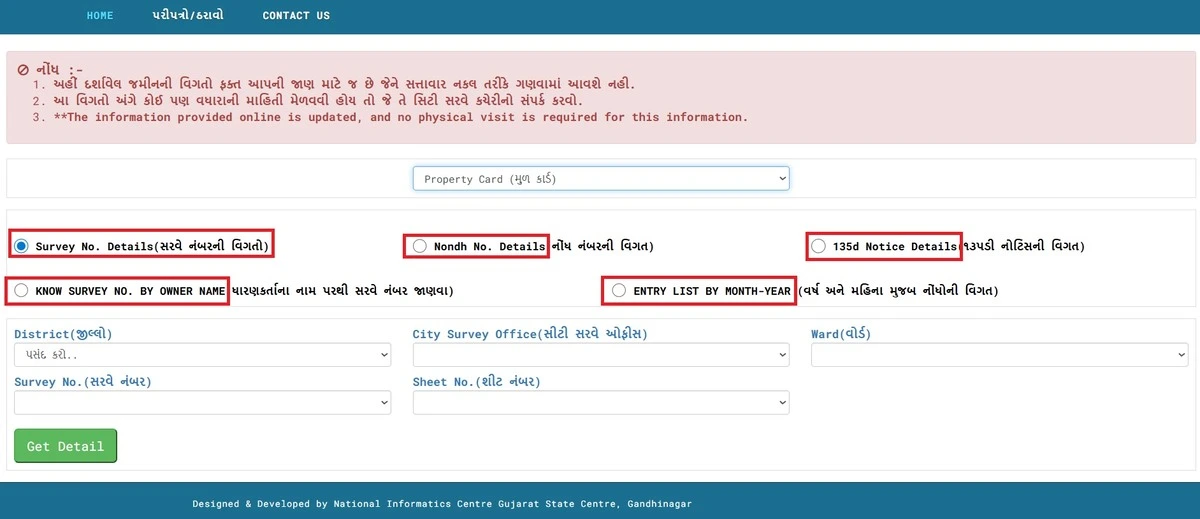
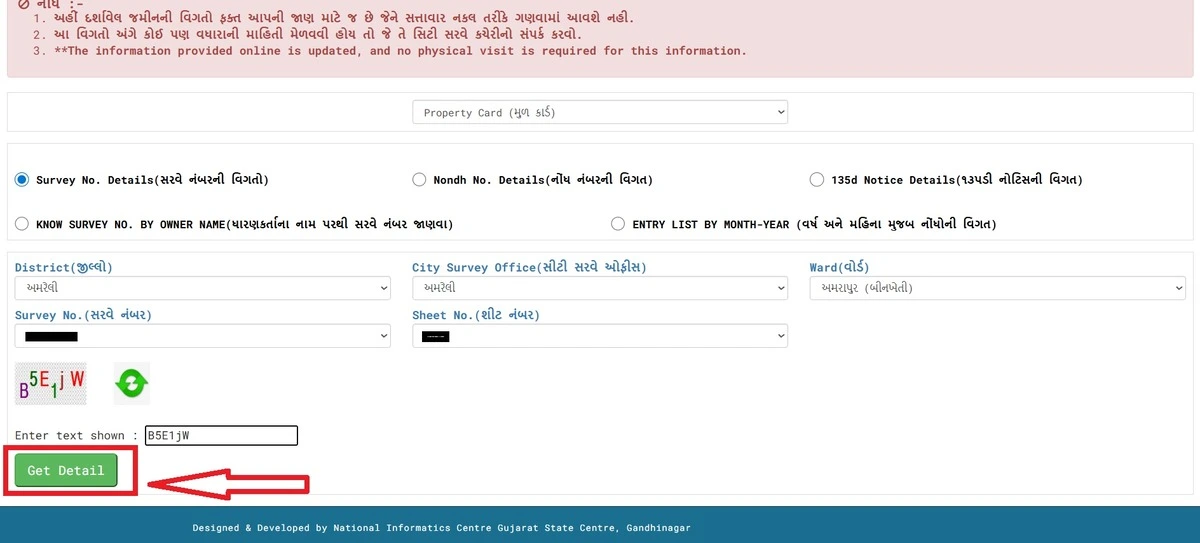
STEP 4 — Enter Location Details (સ્થળ વિગત ભરો)
After selecting the record type, fill in the required location fields:
District (જિલ્લો) — Select your city/district from the dropdown.
City Survey Office (સીટી સર્વે ઓફિસ) — Auto-filters based on your district selection.
Ward (વોર્ડ) — Select the ward where your property is located.
Survey No. (સર્વે નંબર) — Enter the survey number. Find it on your previous Property Card, sale deed (વેચાણ દસ્તાવેજ), or property tax receipt.
Sheet No. (શીટ નંબર) — Select from the dropdown. This is a sub-division reference within the ward.
For Nondh No. search — enter the Nondh Number (નોંધ નંબર) instead. For Owner Name search — type the owner's name exactly as it appears on official documents.
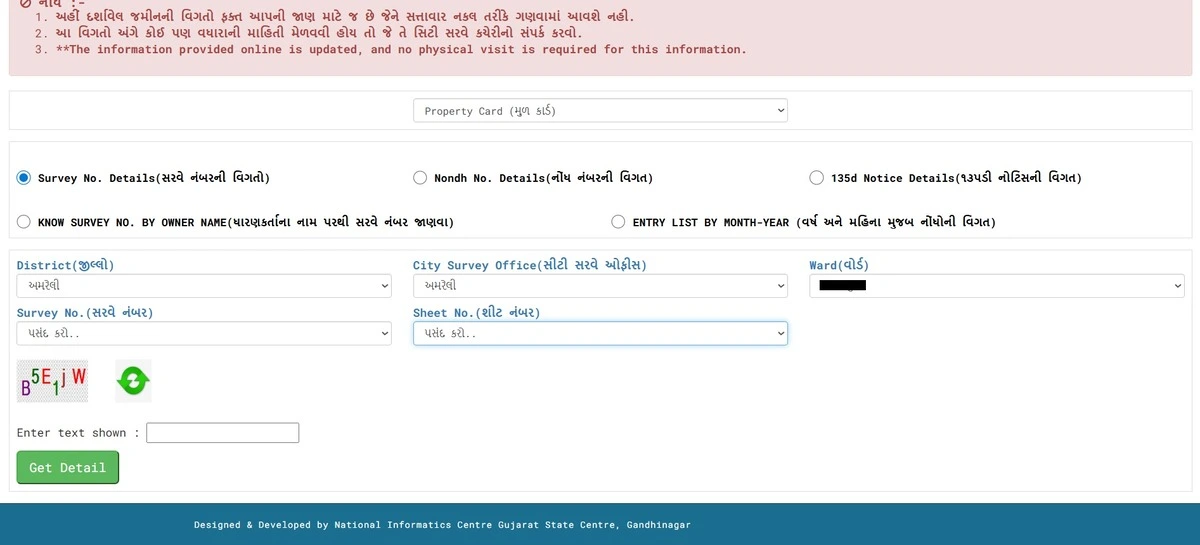
STEP 5 — Solve Captcha (કેપ્ચા) and Click Get Record Detail
Enter the characters from the Captcha image exactly as shown — it is case-sensitive (upper and lower case matter).
If the Captcha is unclear, click 'Refresh Code' to generate a new one.
Important: If the Captcha fails, re-enter only the Captcha text. Do NOT press the browser's Refresh button — it will reset all your dropdown selections and you will need to start over.
STEP 6 — Read the Property Card Results (મિલ્કત કાર્ડ પરિણામ વાંચો)
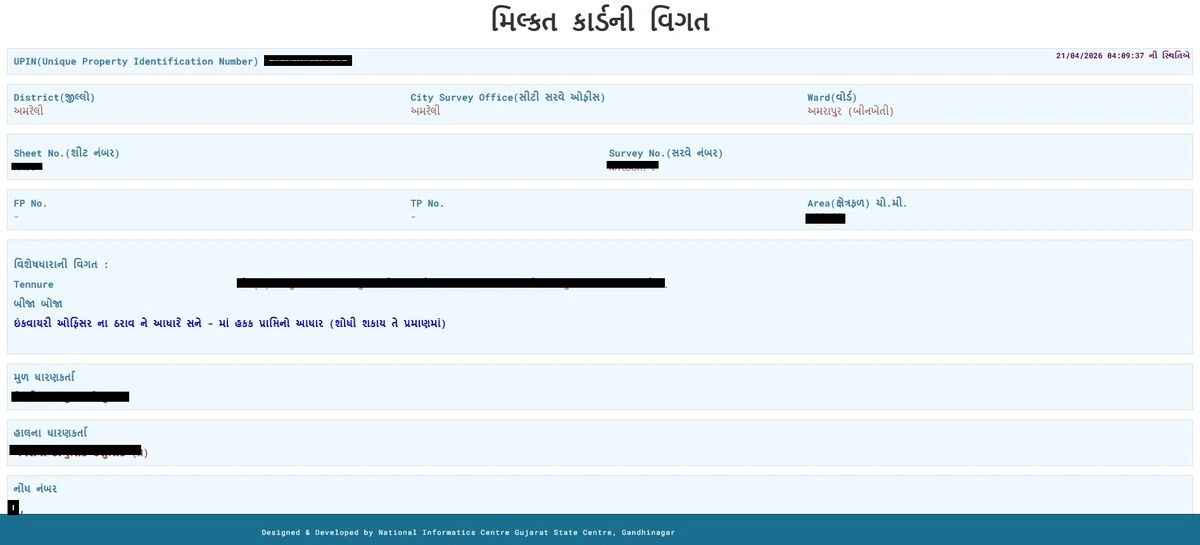
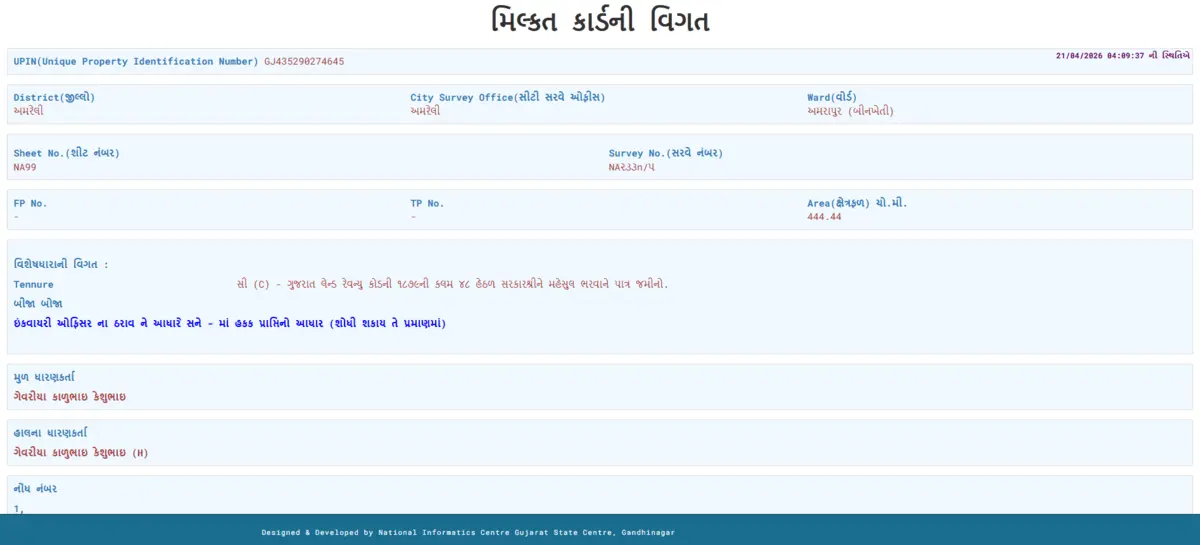
Once submitted, the full Property Card appears on screen. Here is what each section means:
Property Header — Property Unique ID, District, City Survey Office, Ward, Sheet No., and City Survey Number.
Land Details (જમીનની વિગત) — FP No. (TP No.), land area, Original Holder (મૂળ ધારક), Current Holder (વર્તમાન ધારક), and Use of Property.
Property Tax Details (મિલ્કત કર) — Total Pending Dues (કુલ બાકી રકમ), Milkat Number, and owner name as recorded with the municipal corporation.
Electricity Dues — Consumer Number, Consumer Name, and Total Pending Dues. 'No Record Found' means either no dues or not linked to this survey number.
Sub-Registrar Deed Details (ડીડ) — All registered sale deeds linked to this survey number. 'No Record Found' may mean the property has not been formally transferred — investigate further.
IRCMS Revenue Case Details — Active revenue cases on this survey number. An active case is a serious red flag — do not purchase until resolved.
High Court / Civil Court Details — Any active court case means the ownership is legally disputed. Never proceed without advocate advice.
Jantri Details (જંત્રી) — Old and new Jantri rates per square metre. Stamp duty is calculated on this — always check before finalising the sale price.
STEP 7 — Save or Download the Property Card (ડાઉનલોડ / સેવ)
Print as PDF: Press Ctrl+P → Save as PDF to save the record for reference.
Download eSeal Property Card: Click the 'Download eSeal Property Card' link on the results page to get a digitally sealed copy directly from the City Survey Office.
Legal Note: A browser printout is for reference only. For bank loans (બેંક લોન), court submissions, or government applications — you need the eSeal Property Card from the portal or a Digitally Signed RoR from iora.gujarat.gov.in (₹5 per copy).
Why is a Property Card Important? (મિલ્કત કાર્ડ શા માટે મહત્વપૂર્ણ છે?)
A Property Card is not just a formality — it is the legal foundation of every urban property transaction in Gujarat. Here is what it helps you do:
- Verify Ownership (માલિકી ચકાસણી) — Confirm the exact Current Holder (વર્તમાન ધારક) before any purchase, lease, or mortgage agreement.
- Check Property Tax Dues (મિલ્કત કર બાકી) — Unpaid property taxes legally transfer to the new buyer. Always verify the total pending dues (કુલ બાકી રકમ) before signing.
- Trace the Ownership Chain (માલિકી સાંકળ) — The Original Holder (મૂળ ધારક) section tells you who was first granted the land and how it reached the current owner.
- Check for Active Court Cases (ચાલુ કોર્ટ કેસ) — The card shows IRCMS Revenue Cases and High Court/Civil Court cases. An active case means the property is legally disputed — do not purchase.
- Verify Jantri Rate (જંત્રી) — Jantri is the government’s benchmark land value per square metre. Stamp duty (સ્ટેમ્પ ડ્યૂટી) is calculated on this — you cannot legally declare a sale price below Jantri.
- Secure a Bank Loan (બેંક લોન) — Banks require Property Card details for home loan and mortgage processing. Without it, your application will not proceed.
- Verify Sub-Registrar Deed (સબ-રજિસ્ટ્રાર ડીડ) — Confirm that the sale deed is properly registered and matches property records.
Property Card vs Unit Property Card — Which One to Select?
This is the first decision you will face on the portal — and it matters. Selecting the wrong card type will show you irrelevant or incomplete results.
| Card Type | Property Card (મુળ કાર્ડ) | Unit Property Card (એકમ કાર્ડ) |
|---|---|---|
| Also Called | Mul Card | Ekam Card |
| Use For | Independent plots, bungalows, commercial properties | Flats, shops, units in housing societies or apartments |
| What It Shows | Full plot-level record: survey number, FP/TP number, original and current holder, land area | Individual unit record: unit holder, floor, unit number within a larger property |
| Example | A 500 sq. yard plot in a Vadodara residential area | Flat No. 304 in a Surat housing society |
Key Terms on Property Card — Explained in Plain Language
When clients first look at a Property Card, the terminology is often the biggest barrier. Here is every term you will encounter, explained clearly:
| Term | Gujarati | Meaning |
|---|---|---|
| Property Card | મુળ કાર્ડ | Plot-level urban land record showing owner, area, FP number, and use of property |
| Unit Property Card | એકમ કાર્ડ | Unit-level record for flats, shops, or individual units within a larger property |
| Survey Number | સર્વે નંબર | Unique government-assigned number for each urban land parcel |
| Nondh No. | નોંધ નંબર | Mutation or entry number recorded when ownership changes |
| UPIN | UPIN | Unique Property Identification Number — permanent digital ID assigned by government |
| FP No. / TP No. | TP નંબર | Final Plot Number in a Town Planning scheme — confirms legal plot status |
| Jantri | જંત્રી | Government benchmark rate per sq. metre — basis for stamp duty calculation |
| Original Holder | મૂળ ધારક | Person or entity to whom the land was originally granted by the government |
| Current Holder | વર્તમાન ધારક | Present legal owner as recorded by the City Survey Office |
| 135-D Notice | ૧૩૫-ડી નોટિસ | Public notice inviting objections to a mutation — ownership transfer is legally incomplete |
| eSeal Property Card | eSeal કાર્ડ | Digitally sealed, officially authenticated property card — valid for bank and legal use |
| City Survey Office | સીટી સર્વે ઓફિસ | Government office responsible for maintaining urban land records |